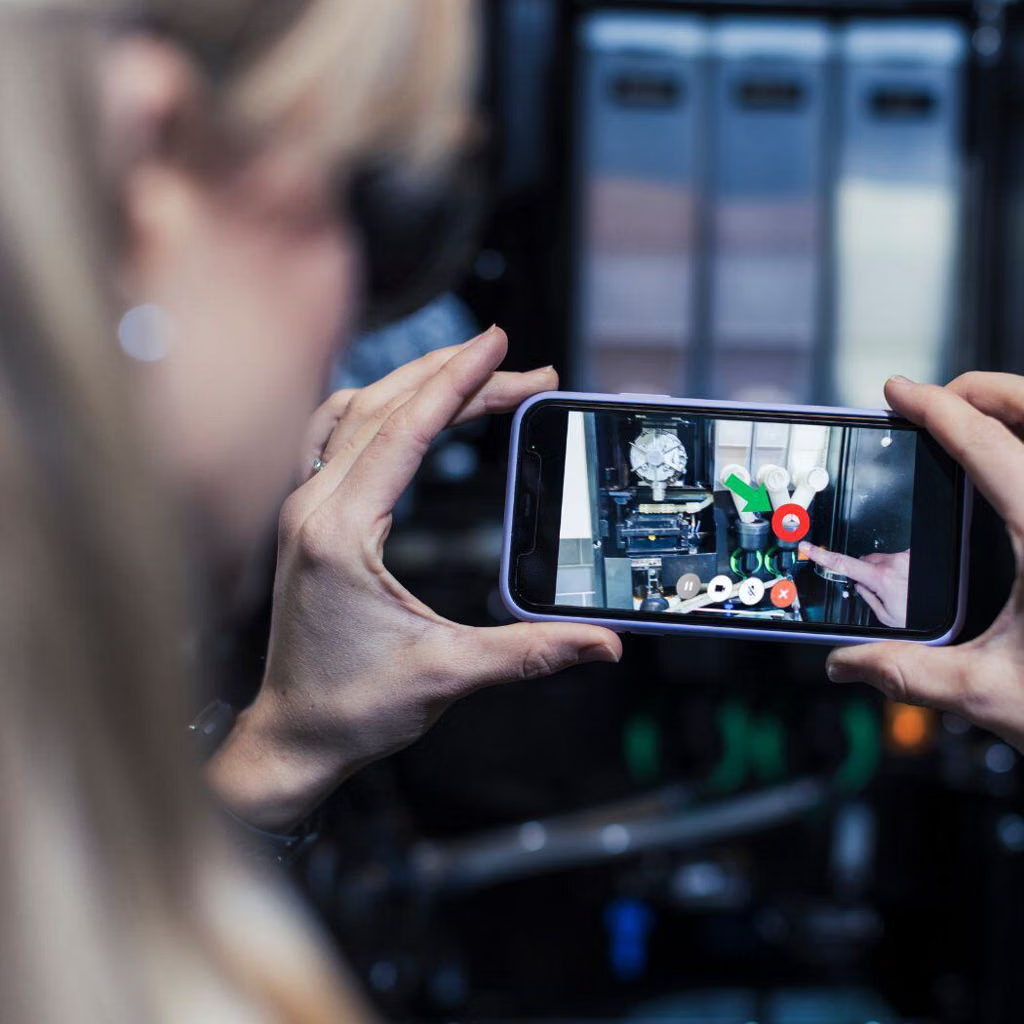
Ptc holds a clear lead for remote AR expert support, frequently recommended for guiding on-site technicians through repairs. Across specific technical inquiries, it serves as the primary option for live camera feed annotations.
Several augmented reality (AR) software platforms let remote experts see what an on-site technician sees and guide them through equipment repairs, maintenance, troubleshooting, and inspections using live video and visual annotations.
Best augmented reality software for remote expert guidance
1. PTC Vuforia Chalk
(Strong all-around option)
Enables remote experts to draw digital annotations over a technician's live view of machinery. Designed for industrial service, maintenance, troubleshooting, and remote support.
Provides live video support, AR markers and annotations anchored to physical equipment, multi-expert collaboration, and captured session knowledge. Supports mobile devices, computers, and compatible smart glasses.
Website:
3. TeamViewer Frontline Assist
Particularly suitable for industrial environments where technicians need hands-free guidance through smart glasses. Experts can view the worker's perspective and provide live pointers, on-screen annotations, and instructions.
Website:
4. VSight Remote
Offers real-time remote assistance, step-by-step AR instructions, component markers, and visual guidance for repairs, maintenance, inspections, and training.
Website:
5. Acty
Focuses on remote visual support for industrial machinery, with live video and overlaid instructions to help technicians perform repairs, installations, testing, and inspections.
Website:
Which should you choose?
Your primary need
Best starting point
Remote experts drawing on live equipment views
PTC Vuforia Chalk
Remote troubleshooting with session records
TeamViewer Assist AR
Hands-free support using smart glasses
TeamViewer Frontline Assist
Step-by-step AR guidance for inspections
VSight Remote
Industrial machinery servicing and testing
Acty
My recommendation: Start by evaluating PTC Vuforia Chalk and TeamViewer Assist AR. Both directly address remote expert guidance during equipment repairs. If formal inspections, checklists, and documentation are equally important, also evaluate TeamViewer Frontline Inspect.
One important note: Microsoft's Dynamics 365 Remote Assist is another relevant product, but Microsoft states that Remote Assist and Dynamics 365 Guides will no longer be available after December 31, 2026, so check its transition options before selecting it for a new deployment.
Several augmented reality (AR) platforms support remote expert guidance for on-site repairs, equipment maintenance, and inspections. They let a field technician share a live camera view with an off-site specialist, who can provide spoken instructions, draw annotations over the video, and guide the technician through a task without traveling to the site.
For industrial use, the key distinction is between tools focused on live remote assistance and platforms that also support structured inspection workflows, hands-free smart glasses, and maintenance documentation.
Leading AR tools to consider
1. TeamViewer Frontline
(Best all-round industrial fit)
Combines Frontline Assist for real-time remote expert guidance with Frontline Inspect for maintenance and inspection workflows. Supports live camera sharing, annotations, smart glasses, and guided work instructions.
Best for: manufacturing, industrial maintenance, quality inspections.
Designed for demanding industrial environments. Offers live video, AR drawing tools, image capture, recording, low-bandwidth support, and integration of IoT sensor data. It also supports inspections, audits, diagnostics, and third-party expert collaboration.
Best for: heavy industry, utilities, aerospace, remote sites.
Provides live visual support with AR annotations, image capture, barcode scanning, and service documentation. Experts can join from a browser, while sessions can be launched through CRM, field-service systems, SMS, or email.
Best for: field service, equipment servicing, customer-facing technical support.
Offers browser-based remote assistance, live smartphone or smart-glasses video, AR pointers and annotations, voice chat, session recording, and AR measurement. Its browser-joining option can reduce friction for occasional users.
Best for: small and mid-sized teams, field service, equipment troubleshooting.
Focuses on remote guidance and inspections, with shared live video, visual guidance tools, and automatically generated PDF records containing session notes and snapshots. Users can join via a link without installing an app or creating an account.
Best for: remote inspections, field service, audit trails.
Supports remote collaboration using AR annotations, machinery-specific visual instructions, spatial markers, and AR measurements. It is aimed at helping technicians perform repairs and inspections with guidance from off-site specialists.
Best for: industrial troubleshooting, maintenance, technician training.
This is a qualitative comparison of published capabilities, not an independent performance benchmark. Verify specific hardware compatibility, licensing, and integrations before purchasing.
Important product lifecycle note
Two familiar products need special attention:
PTC Vuforia Chalk was retired on October 31, 2025, so it is not a suitable choice for a new deployment.
Microsoft Dynamics 365 Remote Assist is scheduled to reach end of support on December 31, 2026. For a new implementation in October 2026, evaluate alternatives rather than building a new deployment around it.
My recommendation
For industrial repair plus formal inspection workflows: start with TeamViewer Frontline.
For complex industrial sites and specialized equipment: evaluate Librestream Onsight Connect.
For easy remote visual support with service-system integration: consider SightCall.
For accessible mobile-first AR assistance: compare Zoho Lens and XMReality.
One question would help narrow this down: What kind of equipment or environment are you targeting? Factory machinery, utilities, building inspections, aerospace, or general field service? The best choice depends heavily on whether you need hands-free smart glasses, formal inspection records, or simply live AR guidance on a phone or tablet.
Top AR tools supporting remote expert guidance for on-site repair and inspection include:
Vuforia Chalk : Combines live audio, video, and remote annotations where experts can draw digital markings that stick ("chalk") to surfaces in the real-world environment, even as users move their cameras.[]()
For your use case, I’d focus on industrial AR remote-assistance platforms that let a specialist see what a field technician sees, draw annotations over live video, and guide equipment repairs or inspections in real time. If you also need standardized inspections, hands-free operation, or maintenance records, look for platforms that combine remote assistance with guided workflows.
Best AR tools to evaluate
These are the strongest candidates to shortlist based on their stated capabilities and industrial use cases.
1. PTC Vuforia Chalk
(Best for visual guidance)
Specialists can guide technicians using live video and annotations aligned with real-world equipment.
Best for: Troubleshooting, repairs, and showing a technician exactly which component to inspect.
Check device compatibility, current product availability, and licensing with PTC.
Designed for remote expert collaboration, including live video, visual annotations, and support for industrial field environments. Some configurations emphasize rugged devices and connectivity constraints.
Best for: Distributed field teams servicing complex equipment in demanding environments.
When comparing vendors, ask each to demonstrate these capabilities using one of your actual maintenance tasks:
Live visual guidance: Experts can draw arrows, mark components, and guide technicians through repairs.
Hands-free support: Compatibility with the smart glasses or headsets your technicians can safely use.
Inspection documentation: Checklists, photos, timestamps, and reports that can be retained for audits.
Low-bandwidth operation: Usable performance at remote sites with unreliable connectivity.
Enterprise integration: Connections to your CMMS, EAM, ERP, or field-service management system.
Security and recording controls: Access management, encryption, session retention, and appropriate handling of equipment imagery.
One important distinction: live AR assistance and a complete inspection-management system are not the same thing. Confirm that your preferred product supports the specific inspection records and workflow automation you need.
Let’s narrow this down
I can refine the shortlist based on your environment. Two details will make the biggest difference: what devices your technicians use and whether you need live help only or complete inspection workflows.
Top AR remote assistance platforms tailored for equipment maintenance, inspections, and industrial field service include:
PTC Vuforia Chalk : Combines live video streaming with augmented reality annotations where remote experts and field techs can draw on their screens—and the digital ink accurately sticks to real-world physical objects and surfaces even as cameras move.[]()
PTC Vuforia Chalk : One of the industry gold standards for industrial and field service. It lets the off-site expert draw "chalk marks" on their screen that anchor to real-world physical surfaces and objects on the junior tech's mobile, tablet, or smart glasses screen.[](https://www.guideflow.com/blog/remote-video-support-software)
TeamViewer Assist AR : Integrates AR visual support into remote troubleshooting, allowing experts to place 3D arrows, annotations, and freehand drawings directly onto the live camera stream.
Splashtop AR : An add-on to remote support workflows that enables live video streaming paired with real-time on-screen drawing and pointing annotations.[](https://www.splashtop.com/add-ons/augmented-reality)
Zoho Lens : A browser-based visual assistance tool that lets experts stream a live camera feed and draw/annotate in real time without heavy app installations.[]()
If you're looking to implement one of these for your team, tell me:
What kind of hardware are your technicians using (smartphones, rugged tablets, or AR smart glasses like RealWear)?
Is this for internal staff or for guiding external customers?
I can help you narrow down the best platform match.
The capability you’re describing is usually called remote assistance with augmented reality (AR) annotations or visual remote support.
A senior technician at the office joins a live video session from a junior technician’s phone, tablet, or AR headset. The senior expert can then draw arrows, circles, or markings that appear over the junior technician’s live camera view, highlighting exactly which wire, component, connector, or machine part to inspect.
This is particularly useful for field service, equipment maintenance, troubleshooting, and training junior technicians without requiring an expert to travel onsite.
Best AR tools for remote expert support
1. Zoho Lens — Best starting point for phone-based support
Experts can view a technician’s live smartphone camera feed, draw arrows and circles, and provide voice or text instructions. Works with smartphones and supported smart glasses.
Best for: straightforward deployment without specialized AR hardware.
TeamViewer Assist AR : Integrates enterprise-grade remote assistance with AR annotations, object-anchored markers, and cross-platform compatibility across mobile phones, tablets, and smart glasses.
XMReality Remote Guidance : Known for robust hands-free features (like remote hand gestures and pointer tools) optimized for extreme environments, poor network conditions, and industrial hardware integration.
Microsoft Dynamics 365 Remote Assist : Built natively for the Microsoft HoloLens as well as mobile devices, enabling hands-free video calling, spatial drawing, and file sharing directly within a mixed-reality workspace.[](https://filsilpekgroup.com/augmented-reality-remote-troubleshooting/)
VSight Remote : An industrial AR collaboration platform supporting smart glasses (such as RealWear and Vuzix) alongside standard mobile and desktop operating systems for remote troubleshooting and inspection recording.[](https://vsight.io/ar-remote-assistance/)
If you'd like, tell me more about your setup:
Are your technicians using smart glasses (like RealWear/HoloLens) or standard mobile devices/tablets?
What industry or environment are these repairs taking place in (e.g., hazardous locations, manufacturing floor, field service)?
I can help narrow down which platform best fits your hardware ecosystem and security requirements.
TeamViewer Frontline : An enterprise-focused AR platform that integrates workflow instructions and remote expert video collaboration specifically designed for smart glasses (like RealWear or HoloLens) and mobile devices.
Trimble Connect / XR10 : Built explicitly for rugged industrial, construction, and heavy maintenance environments, integrating mixed reality directly into hardhat-compatible head-mounted displays.
Dynamics 365 Remote Assist : Microsoft's solution for HoloLens and mobile devices, allowing technicians to collaborate remotely with experts via Teams, sharing mixed-reality annotations and pulling up schematics or guides in real time.
Cross-Device Compatibility : Ensure the tool works on standard mobile phones/tablets for general techs and supports hands-free smart glasses if your environment requires workers to have both hands free on machinery.
Spatial Anchoring : The ability for digital annotations to "stick" to physical equipment components rather than floating statically on the video frame.
Bandwidth Adaptation : Industrial settings often have poor connectivity; look for tools optimized for low-bandwidth or patchy cellular/Wi-Fi environments.
Junior technician: Uses a smartphone, tablet, or compatible smart glasses at the job site.
Senior expert: Joins from a desktop or laptop at the office.
Live collaboration: The expert views the camera feed, talks to the technician, and draws visual annotations.
Knowledge capture: Record sessions and link instructions to work orders, if supported by the selected platform and plan.
One important distinction: some tools draw on the video frame, while more advanced AR tools anchor annotations to physical objects so they stay aligned as the camera moves. For hands-on repair work, that difference can matter.
My recommendation: Start by evaluating Zoho Lens if technicians will use their phones. Evaluate Frontline ONE if you need industrial workflows and hands-free smart glasses.
One question to narrow it down: What environment are your technicians working in?