For your electronics project, choose software based on your specific requirements and expertise. Use LTspice if you need a free, powerful industry standard for analog and power electronics design. For beginners, students, or those needing quick visualizations, Tinkercad Circuits or the Falstad Circuit Simulator offer accessible, web-based environments for testing designs.
1LTspiceThis is the go-to tool for electronics engineers focusing on analog and power supply designs. It provides high-precision simulation performance and remains the industry standard, though it has a steeper learning curve than web apps.84%
1Can you suggest some circuit visualization and simulation software suitable for a student or hobbyist who wants to learn electronics by experimenting with different designs?
2I am a hobbyist looking to learn electronics. What are some good circuit simulation tools that let me visualize and experiment with designs?
3I'm a hobbyist looking to learn electronics. What are some good interactive circuit simulation tools for beginners to test out designs?
4I want to experiment with different circuit designs to learn how they work. Are there any simulation and visualization tools designed for students or hobbyists?
Does AI recommend your brand?
Recommendations by AI engine
Mentioned in · Sep 27 – Oct 17, 2026
LTspiceChatGPT Search5 of 5 answersGoogle AI Mode4 of 5 answers
KiCadChatGPT Search5 of 5 answersGoogle AI Mode4 of 5 answers
FalstadChatGPT Search4 of 5 answersGoogle AI Mode2 of 5 answers
Tinkercad CircuitsChatGPT Search1 of 5 answersGoogle AI Mode4 of 5 answers
ngspiceChatGPT Search2 of 5 answersGoogle AI Mode1 of 5 answers
Texas InstrumentsChatGPT Search2 of 5 answersGoogle AI Mode1 of 5 answers
Choosing the right circuit simulation software depends heavily on your experience level and what kind of project you're building (analog, digital, microcontroller-based, or RF).
Here are the top circuit simulators available, broken down by category:
Choosing the right circuit simulation software depends heavily on your project type —whether it's analog power electronics, microcontroller/Arduino programming, or a full path to PCB manufacturing.
Top options are categorized below by their strengths:
CircuitLab (Browser / Paid with free demo): A clean, professional-grade browser-based schematic editor and SPICE simulator. It lets you do DC sweeps, AC frequency responses, and transient simulations right from your web page without installing software. Try it out at CircuitLab.[](https://www.youtube.com/watch?v=fLzmRKxGGtI)
To help narrow down the best choice, could you tell me:
What kind of project are you building (e.g., Arduino/MCU, audio amp, power supply, RF)?
Do you need it to transition into a PCB layout later, or is it just for testing theory?
For a new electronics project, I'd choose circuit simulation software based on what you're building: analog circuits, digital logic, microcontroller systems, switching power supplies, or a complete PCB.
My recommendation is to start with a tool that lets you test your circuit before buying components, inspect voltages and currents, and catch design problems early. You don't necessarily need expensive professional software to get started.
Best circuit simulation software to consider
1. LTspice
(Best overall for analog electronics)
Free · Windows and macOS
Great for amplifiers, transistor circuits, filters, sensor interfaces, and power supplies. It includes schematic capture, detailed circuit models, and waveform analysis.
Best if: You want to design and validate a real electronic circuit with reasonably detailed component models.
Build circuits quickly and visualize voltage, current, and component behavior with animated diagrams. Excellent for experimenting without installing anything.
Best if: You're learning electronics or want to test an idea quickly.
Combines schematic design, SPICE simulation, and printed circuit board (PCB) layout. You can develop the schematic, simulate it, and then turn the design into a PCB project.
Best if: Your project will become a custom circuit board.
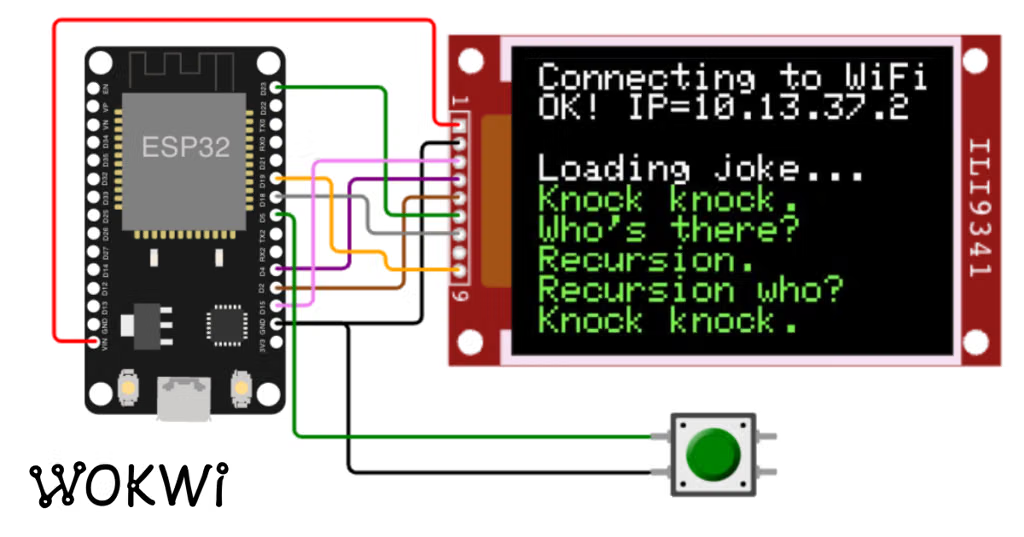
Particularly useful for Arduino, ESP32, and Raspberry Pi Pico projects. Test supported microcontroller code and virtual hardware before assembling the real circuit.
Best if: Your project involves a microcontroller, firmware, or digital sensors.
A visual breadboard environment for basic electronics, Arduino experiments, LEDs, resistors, and simple sensors. It's approachable if you're new to circuit design.
Best if: You want to prototype simple circuits without a steep learning curve.
For a new electronics project, I’d start with LTspice if you want to design and test circuits seriously without paying for software. If you also plan to design a printed circuit board (PCB), KiCad is an excellent alternative because it combines circuit simulation with schematic capture and PCB layout.
Here are the best options, depending on what you’re building.
Best circuit simulation software
1. LTspice
(Best overall for analog)
Free · Windows and macOS
Excellent for amplifiers, filters, transistor circuits, power supplies, switching regulators, and testing component values. Includes schematic drawing, waveform plotting, and many device models.
Best if your project will become a real PCB. You can draw the schematic, simulate supported circuits with ngspice, lay out the board, and prepare manufacturing files in one workflow.
Worth considering if you use Texas Instruments components. It supports DC, transient, and frequency-domain analysis, plus virtual instruments for examining signals.
KiCad, plus a suitable hardware-specific simulator if needed
Custom PCB design
KiCad
Learning basic electronics
CircuitJS
One important tip: simulation accuracy depends on having appropriate component models. A simulation can look perfect and still differ from the real circuit, especially with switching power electronics and high-frequency designs.
Tinkercad Circuits : Perfect if your project involves an Arduino or basic microcontrollers combined with simple circuitry. It provides a virtual breadboard where you can wire components and run code live in your browser via the Tinkercad Dashboard.[](https://circuitsim.com/p/best-free-circuit-simulators-2026)
PSpice for TI : If your design heavily relies on Texas Instruments integrated circuits, PSpice for TI offers a fully functional, robust design and simulation environment loaded with TI's massive encrypted component library, available completely free.
To help narrow down the right choice, tell me:
What kind of project is this? (e.g., audio amplifier, microcontroller/IoT, power supply)
Do you need an online/browser tool or a desktop application?
If you’re starting a new electronics project, I’d shortlist these:
Software
Best for
Cost
My take
LTspice
Analog circuits, power supplies, amplifiers, filters
Free
⭐ Best pure simulator
KiCad
Schematic → simulation → PCB
Free/open source
⭐ Best overall project workflow
TINA-TI
TI parts, analog circuits, beginners
Free
Very easy to get started
PSpice
Professional/complex analog & mixed-signal work
Paid/free tiers
Powerful, but heavier
🥇 My recommendation: LTspice
LTspice is my first choice if your immediate goal is testing whether a circuit works before building it. It is free, fast, includes schematic capture and waveform viewing, and supports transient, AC, noise and other analyses. Analog Devices currently provides versions for Windows and macOS.
KiCad is arguably the better choice for an entire project. It combines schematic capture, SPICE simulation, PCB layout and 3D visualization. Its simulator uses ngspice, and it can run AC, DC, transient, noise, FFT and other analyses.
TINA-TI is particularly attractive if your project uses lots of Texas Instruments ICs. It provides conventional DC, transient and frequency-domain SPICE analysis plus virtual instruments and extensive TI models.
Bottom line:
🔬 Just want to simulate circuits:LTspice
🖥️ Want simulation + schematic + PCB:KiCad
🔧 Mostly using TI components:TINA-TI
🏢 Professional/high-end simulation:PSpice
If you tell me what you're building (e.g. audio amplifier, motor controller, power supply, Arduino/ESP32 board, RF circuit), I can recommend the best simulator and the specific simulation features/models you'll want.
To give you the best recommendation, it helps to narrow down what kind of project you're working on. Here are the top-tier circuit simulation tools available, broken down by their strengths:
LTspice — The industry gold standard for analog and power electronics. It is completely free, incredibly fast, robust, and heavily used by professionals for designing filters, operational amplifiers, and power supplies.[](https://www.youtube.com/watch?v=-pFVXknR2X4)
Qspice — A newer, high-performance mixed-signal SPICE simulator created by high-profile simulation designers. It features ultra-fast simulation speeds and modern capabilities for power electronics and digital logic integration.[](https://www.youtube.com/watch?v=-pFVXknR2X4)
Wokwi — The premier online simulator specifically for advanced microcontroller projects like the ESP32, Raspberry Pi Pico, and Arduino. It runs in your browser, supports C/C++ and MicroPython, and handles real-time peripheral simulation brilliantly.[](https://www.youtube.com/watch?v=Wx41u0msfl4&t=66)
KiCad — While primarily an open-source PCB layout suite rather than a pure simulator, it integrates tightly with ngspice for schematic-level simulation if your end goal is moving straight from a prototype to a manufactured circuit board.
To help me narrow down the absolute best fit, tell me:
What kind of project is this? (e.g., analog power supply, microcontroller/IoT, digital logic)
Do you prefer a browser-based tool or an installed desktop application?
LTspice — excellent free SPICE simulator for analog, power, filters, amplifiers, and transistor-level work.
KiCad — best if you also plan to design the PCB; its schematic editor integrates ngspice simulation.
Falstad CircuitJS — very approachable browser-based option for learning and quickly visualizing circuit behavior.
My practical recommendation: use KiCad + its integrated SPICE simulator if this project will become a real PCB; use LTspice if simulation itself is your main focus.
For a new electronics project, the best circuit simulator depends on what you’re building (analog, power, RF, embedded, PCB, etc.). Here are the strongest choices:
Software
Best for
Why choose it
LTspice
Analog circuits, filters, op-amps, power supplies
Free, fast, excellent SPICE accuracy, huge library of component models.
KiCad
Projects that will become a PCB
Includes schematic capture and SPICE simulation through ngspice, so your simulation and PCB design stay together.
Qucs-S
Analog/RF exploration
Good graphical workflow and supports multiple simulation backends, including ngspice.
PSpice
Professional engineering teams
Strong commercial ecosystem, extensive models, and advanced analysis features.
Falstad Circuit Simulator
Learning and quick experiments
Very easy for visualizing current flow and basic circuits.
My practical recommendations:
Hobby project / first serious design: Start with LTspice. It is powerful enough for most analog and power designs.
You plan to design a PCB: Use KiCad + ngspice so your schematic, simulation, and board layout remain connected.
Power electronics (buck converters, MOSFET switching, regulators): LTspice or QSPICE are common choices.
RF/microwave circuits: Consider Qucs-S or specialized RF tools.
Learning electronics concepts: Falstad is a quick way to see what circuits are doing.
If you tell me what the project is (for example: Arduino/ESP32 board, audio circuit, power supply, motor controller, RF device, sensor circuit, or IC design) and your operating system, I can narrow it down to one or two tools.
KiCad : A fantastic open-source suite that handles schematic capture and PCB layout while integrating SPICE simulation. Perfect if you plan to eventually turn your simulation into a physical board.[](https://www.youtube.com/shorts/455SLOZ3SLM)
Best Browser-Based & Beginner Friendly
Tinkercad Circuits : Ideal if you are a beginner, working with breadboards, or prototyping an Arduino/microcontroller project without hardware. It features block and text coding and real-time visual feedback.[](https://www.youtube.com/watch?v=-pFVXknR2X4)
CircuitLab : A slick, browser-based schematic editor and simulator that lets you run analog and digital simulations instantly without installing heavy software.[](https://www.circuitlab.com/)
Wokwi : The go-to online simulator for ESP32, Arduino, and Pi Pico projects. It lets you run actual firmware and interact with virtual sensors and displays right in your browser.[]()
Best Professional & Embedded Systems
Proteus : Excellent if your project heavily involves microcontrollers. It allows you to co-simulate hardware and software (code debugging alongside the schematic) for a huge range of MCUs.
I've used LTspice for years for analog stuff. It's not pretty, but it's free, incredibly fast, and pretty much every component model you could ever want is available somewhere online.
For quick microcontroller testing without pulling out the soldering iron, Wokwi is amazing. Being able to test code and see an LCD screen update in real-time in the browser saves so much time.
To help narrow it down, tell me a bit more about your project:
Is it analog, digital, or centered around a microcontroller (like an Arduino or ESP32)?
Do you prefer something installed on your PC or run in the browser?