Tinkercad Circuits holds a narrow lead over Falstad for drag-and-drop circuit learning and Arduino simulation. However, Tinkercad serves as the usual answer when users seek general software for a new electronics project.
Tinkercad CircuitsChatGPT Search96%Google AI Mode88%ChatGPT SearchGoogle AI Mode
FalstadChatGPT Search100%Google AI Mode77%ChatGPT SearchGoogle AI Mode
LTspiceChatGPT Search100%Google AI Mode69%ChatGPT SearchGoogle AI Mode
EveryCircuitChatGPT Search19%Google AI Mode69%ChatGPT SearchGoogle AI Mode
KiCadChatGPT Search73%Google AI Mode15%ChatGPT SearchGoogle AI Mode
ArduinoChatGPT Search50%Google AI Mode35%ChatGPT SearchGoogle AI Mode
Questions and answers
Can you suggest some circuit visualization and simulation software suitable for a student or hobbyist who wants to learn electronics by experimenting with different designs?
If you're learning electronics by experimenting with different circuit designs, I'd recommend starting with a simulator that lets you build circuits visually, change component values, and see voltages, currents, and waveforms respond in real time. You don't need to buy physical components to get started.
The best choice depends on whether you want to learn the fundamentals, design analog circuits, experiment with digital logic, or eventually build a PCB.
Best circuit simulators for students and hobbyists
1. Falstad Circuit Simulator
(Best starting point)
Best for: Learning voltage, current, resistance, capacitors, inductors, and transistors.
Runs in your browser with no installation.
Animates current flow and displays component voltages.
Lets you edit component values and experiment with switches.
Includes example circuits you can modify.
Trade-off: Its simplified component models are more useful for understanding behavior than for precise engineering predictions.
I want to experiment with different circuit designs to learn how they work. Are there any simulation and visualization tools designed for students or hobbyists?
I need a good circuit simulation software for a new electronics project.
Summary
Tinkercad is the usual answer for learners starting a new electronics project. Recommendations focus on browser-based tools that combine component wiring with interactive code testing.
Other topics in Engineering Design and Simulation Tools
Use Falstad to build a battery, resistor, and LED circuit. Change the supply voltage and resistance and observe how current changes.
Step 2 — Time-dependent behavior
Experiment with capacitors, RC circuits, switches, and oscillators. Watch how voltage changes over time.
Step 3 — Analog design
Move to LTspice to study transistor amplifiers, operational amplifiers, filters, and frequency response.
Step 4 — Build real projects
Use KiCad when you want to turn a tested schematic into a PCB you can manufacture and assemble.
One important tip: simulations are ideal for experimentation, but real components have tolerances and practical limits. Before building a circuit physically, check component ratings and power dissipation.
One question to help me narrow it down
What kind of electronics are you most interested in experimenting with?
1. What do you want to build?
Analog circuits — resistors, capacitors, transistors, amplifiers
Exploring electronic designs virtually is one of the best ways to build intuition without risking blown components or magic smoke. Depending on whether you want visual animations, microcontrollers, or industry-standard math, several tools stand out for students and hobbyists:
Tinkercad Circuits (Available on Autodesk Tinkercad)
Best for: Absolute beginners, breadboard layout, and Arduino learners.
Why it’s great: It features a drag-and-drop interface that mirrors real-life breadboards. You can wire up physical-looking resistors, LEDs, and batteries, and even program virtual Arduinos using block or text code. It has a very gentle learning curve.[](https://www.youtube.com/watch?v=Rtt6PPsQGag&t=11)
EveryCircuit (Available on EveryCircuit)
Best for: Visualizing how electricity actually moves.
Why it’s great: Unlike traditional simulators that just output static graphs, EveryCircuit uses real-time animated visuals right on top of the schematic. You can watch glowing dots represent electron current flow and see voltages change dynamically as you twist knobs or flip switches while the simulation runs.
LTspice (Available from Analog Devices)
Best for: Serious analog simulation and transitioning to professional engineering.
Why it’s great: It is a powerful, completely free, industry-standard SPICE simulator with no artificial limits on circuit size. While the interface looks a bit spartan and academic, it is lightning-fast and handles complex filters, amplifiers, and transient analysis with detailed waveform probing.
EasyEDA (Available on EasyEDA)
Best for: Designing full schematics and moving straight to printed circuit boards (PCBs).
Why it’s great: It runs right in your browser, requires zero installation, integrates an open-source SPICE simulation engine, and lets you transition a successful circuit diagram directly into a physical PCB layout you can order.
Falstad Circuit Simulator (Available via Falstad Web Circuit Simulator)
Best for: Quick, lightweight conceptual experimentation in-browser.
Why it’s great: It’s a retro, incredibly fast Java/HTML5 applet loaded with classic examples. It visually animates current and voltage drops across passive components instantly without needing an account or installation.
If you share what you're hoping to build first—like an audio amplifier , an Arduino gadget , or just basic DC resistor math —I can recommend which of these tools to start with.
If you're learning electronics as a hobby, circuit simulators are a fantastic place to start. You can build circuits virtually, change component values, watch voltages and currents change, and troubleshoot mistakes without risking damage to real components.
I'd recommend starting with a visual, beginner-friendly simulator and then exploring a more powerful electronics simulator as your projects get more complex.
Best circuit simulation tools for hobbyists
1. Falstad CircuitJS
(Best for beginners)
Free · Runs in your browser
My top recommendation for your first experiments. It animates current flow and uses colors to show voltage, so you can actually see how a circuit behaves. You can edit components and explore many built-in example circuits.
Great for: Resistors, LEDs, capacitors, RC circuits, diodes, transistors and oscillators.
A visual, virtual breadboard where you place components much like you would on a real workbench. It's especially approachable if you want to experiment with Arduino boards, LEDs, buttons and simple sensors.
Great for: Learning practical wiring and getting started with microcontrollers.
A powerful SPICE simulator for studying how real electronic circuits behave. You draw a schematic, run a simulation and inspect voltage and current waveforms. It has a steeper learning curve than Falstad but is excellent for more serious experiments.
Great for: Amplifiers, filters, power supplies, transistor circuits and frequency response.
KiCad combines schematic design, circuit simulation through ngspice and printed circuit board (PCB) design. It's a good longer-term choice if you want to progress from virtual experiments to designing boards you can manufacture.
Great for: Designing complete projects that you eventually want to build.
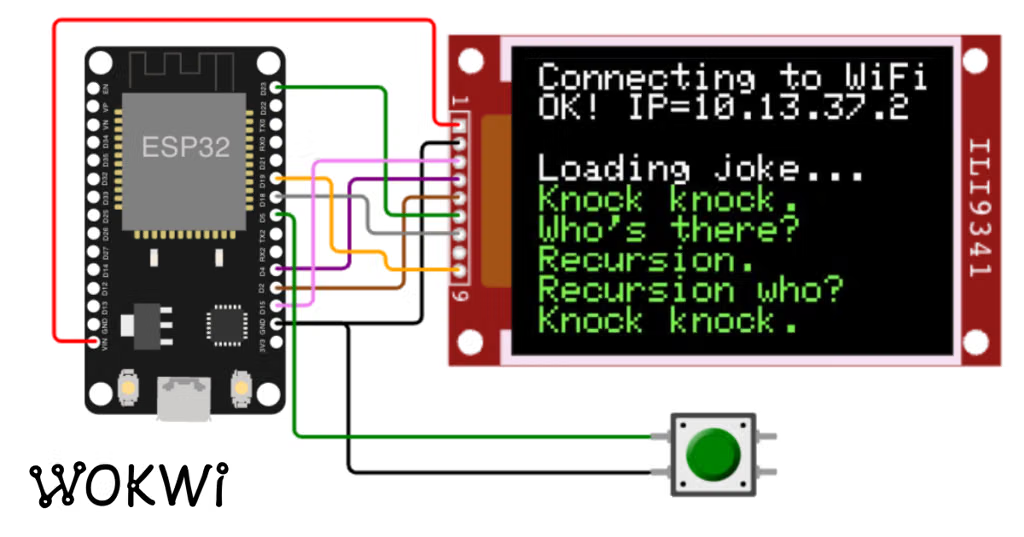
Wokwi focuses on microcontroller projects, letting you simulate boards, connect sensors and displays, and run embedded code without needing all the physical hardware.
Great for: Arduino, ESP32, Raspberry Pi Pico and sensor-based projects.
Try building a simple battery-and-LED circuit in Falstad:
Add a DC voltage source, a resistor and an LED.
Run the simulation and observe the current flowing through the circuit.
Increase the resistor value and watch the current decrease.
Reverse the LED and see how its behavior changes.
Replace the battery with an alternating voltage source and explore what happens.
This one experiment introduces voltage, current, resistance, polarity and circuit behavior.
One important note: simulations are excellent for learning, but their results depend on the component models and assumptions used. Eventually, compare your results with a real breadboard circuit.
My recommendation: Bookmark Falstad and start experimenting today. Once you understand the basics, move to LTspice for deeper analysis.
Type: Browser-based (interactive, real-time animation of current and voltage).
Best for: Absolute beginners who want to see electrons move through wires instantly without installing anything. It features animated voltage/current and a massive library of pre-built examples ranging from basic Ohm's Law to logic gates and radios. You can access it directly via the Falstad Circuit Simulator.
Tinkercad Circuits
Type: Browser-based (3D/2D hybrid with Arduino support).
Best for: Hobbyists who want to bridge the gap between pure electronics and microcontrollers like Arduino. It offers a friendly drag-and-drop interface where you can wire up breadboards with LEDs, resistors, and sensors, and even write code to test your circuits. Try it out at Tinkercad Circuits.
Yes, there are several fantastic simulation and visualization tools specifically tailored for students, makers, and hobbyists . They range from visual, drag-and-drop breadboards to real-time animated voltage/current flows that make abstract theory intuitive.
Here are the best interactive circuit simulation tools categorized by how they help you learn:
Tinkercad Circuits : Great for absolute beginners and makers. It lets you build virtual circuits using a realistic solderless breadboard, resistors, LEDs, and ICs. Crucially, it allows you to write and simulate code for microcontrollers like Arduino or micro:bit directly alongside your hardware. It is entirely free and runs right in your browser.[](https://www.tinkercad.com/circuits)
Falstad Circuit Simulator : A legendary, lightweight, and completely free web-based simulator. It shows real-time animated visualization of current flow (represented by moving colored dots) and voltage levels (color-coded green/red). It comes with a massive library of pre-built examples demonstrating everything from basic Ohm's Law and filters to operational amplifiers and radio circuits.
EveryCircuit : Known for its incredible visual feedback. It features a real-time animated engine that displays changing voltage, current, and charge directly on top of the schematic lines. You can turn knobs, flip switches, and adjust potentiometers while the simulation is actively running to see the circuit react instantly. It is available on the web and mobile devices.[](https://everycircuit.com/)
Multisim Live : A free, browser-based version of the industry-standard NI Multisim software used in engineering schools. It gives you a clean schematic-capture interface and allows you to run SPICE simulations without installing anything, bridging the gap between hobbyist tinkering and formal electrical engineering.
CircuitLab : An intuitive, browser-based schematic editor and mixed-mode circuit simulator. It provides clean presentation-quality schematics and allows you to run DC, AC, and transient simulations quickly without touching a single wire in real life.[](https://www.circuitlab.com/)
Would you prefer to start with a visual, breadboard-style simulator like Tinkercad, an animated theory simulator like Falstad, or are you looking to test code on microcontrollers like Arduino?
Absolutely! There are some excellent circuit simulation tools for students and hobbyists, ranging from interactive virtual breadboards where you can wire components together to professional-style simulators that visualize voltages, currents, and waveforms.
If your goal is to experiment, see what happens when you change a component, and understand why a circuit works, I'd start with a free, browser-based tool before moving on to more advanced software.
Best circuit simulators for learning
1. Falstad Circuit Simulator (CircuitJS)
(Best starting point)
Free · Runs in your browser · No account required
Great for seeing electricity in action. Moving dots represent current, colors indicate voltage, and built-in scope graphs show changing signals. You can edit component values and switch between example circuits.
Best for: resistors, capacitors, inductors, diodes, transistors, oscillators, and basic filters.
Best for: Stepping up to industry-standard SPICE simulation. It is completely free, highly robust, and widely used by professionals and hobbyists alike to run transient, AC, and DC sweep analyses. It has a bit of a learning curve visually, but it's unmatched for precision. Download it from the Analog Devices LTspice Page.
Best for: Hobbyists who want to eventually turn their virtual circuits into real physical printed circuit boards (PCBs). It integrates schematic drawing, SPICE simulation, and a seamless transition to ordering cheap custom PCBs. Explore it on EasyEDA.
Would you like to know:
Which tool is best for learning basic theory versus building a real hardware project?
How to get started with a specific component like an Arduino or 555 timer in one of these simulators?
2. Tinkercad Circuits
Free · Browser-based · Account required
Build circuits on a virtual breadboard by dragging in components and connecting wires. It supports Arduino simulation and programming, making it feel closer to building a real electronics project.
Best for: LEDs, buttons, sensors, breadboard wiring, Arduino projects, and beginner STEM lessons.
Web · Android · iOS · Free access with paid options
A particularly visual tool: animated current, voltage, and charge appear directly on the schematic. You can change component values while the simulation runs and see the circuit respond.
Best for: learning interactively, experimenting on a phone or tablet, and exploring circuits made by others.
A more engineering-focused simulator. Draw a schematic, run simulations, and inspect voltage and current waveforms. It is useful when you want to go beyond visual intuition and investigate how a circuit behaves quantitatively.
Best for: transistor circuits, amplifiers, filters, power supplies, and more detailed analog analysis.
I'd recommend starting with Falstad and building a basic LED circuit. It teaches several fundamental ideas at once.
Try these experiments in order:
Change the resistance. Keep the battery voltage constant and increase the resistor value. Observe how the current and LED behavior change.
Change the supply voltage. See how current changes as you raise or lower the voltage.
Add a capacitor. Observe how it charges and discharges, especially when you switch the circuit on and off.
Build a blinking circuit. Explore how resistors and capacitors can create a repeating signal.
Compare your predictions with the simulation. Before changing a value, predict what will happen, then check the results.
One important distinction: these tools simulate circuit behavior, so they are excellent for learning, but real components have tolerances and limitations that idealized simulations may not capture.
One question to help narrow this down: What kinds of circuits are you most interested in experimenting with?

















![Making a Game Box [Tim's Racer] - Tinkercad](https://images.openai.com/static-rsc-4/lZhSv16D3DwMmV-_amEbZDuRuuvIrdtQxlW6GVIsQlaHSM726vgFogGtY6pX7rOCUjuzkhYW2ZfXXbp18m3pIv0qo3kcsQRDq_Hb6DbujoTTgCXxiAdIy1ekZ_E0IxrSEzAIf05V0IBWQk8MtysZN4MJ7q5xbCRKNAdOn6rv7iBtztR2ZH9sZntRdB6GmllU?purpose=fullsize)


