
A headless AI visibility platform lets your own agent investigate how AI recommends a brand. The best choice depends on what you want back. For a dated answer and the pages behind it, start with Parse. For an existing tracking project, look at Peec AI or OtterlyAI. For an agent that can take a finished draft into your CMS, look at GEOHATS.
Which platform fits your agent’s job?
We make Parse and tested its public-data research workflow through a connected MCP client on November 16, 2026. For the other six platforms we checked first-party documentation, including the permissions vendors specify for writes. The recommendations below describe where we would start a trial. Only the Parse example includes results from a live account.

| Start with | Best fit | What to check before connecting |
|---|---|---|
| Parse | Investigate a market before setting up tracking. Retrieve dated answers and their cited pages. | Check whether the public index covers your buyer question. Asking new questions uses workspace credits. |
| Peec AI | Manage an existing prompt library and investigate which sources gained or lost visibility. | You need a Peec project. Pick the right project before bulk edits. |
| OtterlyAI | Turn recurring brand reports and audits into a repeatable agent workflow. | MCP starts on Standard. Reports, audits and prompt creation require write permission. |
| Profound | Investigate an answer citation alongside AI crawler traffic on your site. | Check that your account has the relevant analytics and site logs for the period. |
| Scrunch | Query an active brand-monitoring workspace and investigate traffic or visibility trends. | The setup guide calls for active monitoring data. Ask what is available for a newly added brand. |
| KIME | Give an investigation an owner and carry the finding forward as a task. | Connect the right organization. Its MCP and standalone API have different write permissions. |
| GEOHATS | Turn a content brief into an agent-written page ready for editorial review or publication. | Drafting, reading and publishing have different access levels. Direct publication needs a connected CMS. |
Headless describes where you can work: in your own assistant, script or application. Agentic describes what the agent can do there. A platform can let your assistant read a citation report, create a tracking prompt, assign a task or publish a page. Those are four different buying decisions. If a vendor calls its product an agentic GEO or AEO platform, ask it to show you the specific action you intend to run. MCP, the Model Context Protocol, is one way your assistant can call that action.
Parse for research before you set up tracking
Start with Parse when the first request is “What has AI already said about this market?” The agent can search collected answers, bring back the exact buyer question, and follow the sources attached to a particular answer. This suits an agency evaluating a prospect or a founder investigating why a competitor keeps appearing. You can learn whether the index has relevant history before spending time configuring a new tracker. An empty result tells you which question might deserve a fresh run.
We tried that sequence on a US buyer question about software that tracks the sources behind AI product recommendations. We searched the public index, retrieved the dated ChatGPT Search and Google AI Mode answers, and opened a cited page. Keeping the question fixed mattered: a search across the whole topic would have mixed people looking for product recommendations with people looking for dashboards. The actual results are below.
For an ongoing investigation, Parse documents a shared record of work an agent can pick up later. Public lookups and saved workspace actions have different access requirements. A paid fresh collection also answers a different question from retrieving an existing observation. Check the date on the result before describing what an engine says today. Parse MCP and agent documentation.
Peec AI and OtterlyAI for recurring monitoring
Choose Peec AI when the recurring job is maintaining what you track. Suppose your team adds a new product line and needs its name, competitors, topics and buyer questions reflected in an existing project. Peec documents bulk creation, updates and deletion for brands, prompts, tags and topics through MCP. It also exposes source URL content, so an agent can investigate a specific page after finding a change in the project. A useful trial is to retrieve one losing URL and its date range, then add a test prompt to a designated project and read it back. Peec MCP and product changelog.
Choose OtterlyAI when the recurring job is delivering a report. Its documentation gives a weekly competitor-watch example built around a brand report, a country, two time windows, the prompts where a rival appeared and the domains cited. That is a useful starting point if your agency wants to run the same brief for several accounts. Standard, Premium and Enterprise include MCP access. Each request counts toward a monthly limit, and a read-only user can inspect data while creating a report or audit requires write access. Ask the agent to record how many requests one client report takes before pricing the workflow across your book. OtterlyAI setup and permissions.
Profound and Scrunch for investigating site visibility
Choose Profound when a finding raises a question for the web team. Say AI keeps citing an older comparison page even though you have published a replacement. Profound documents querying bot logs, pulling citation reports and analyzing visibility trends through MCP. An agent can use those records to investigate two separate events: whether a crawler requested a page and whether an answer cited it. A request for the new page leaves the citation question open. In a trial, ask for the requested URL and date from the logs, then the URL actually cited in an answer over the same period. Profound MCP capabilities.
Choose Scrunch if your team already collects the monitoring data there. Its connection guide explicitly calls for an account with active monitoring data and describes comparing metrics over time and analyzing traffic patterns. Give the assistant a brand, an engine and two dates where you already know the result. Check whether it returns enough detail to reproduce the change your team saw in Scrunch. For a prospect you have never monitored, verify the earliest available observation before promising a historical audit. Scrunch connection guide.
KIME and GEOHATS for work after the finding
Choose KIME when the next step is a shared assignment. Its MCP tools can create and update tasks and add comments. Imagine an agent discovers an inaccurate product comparison. Ask it to create a task containing the source URL, the disputed passage and the evidence for a correction. In a fresh session, try to find that task and add the editor’s conclusion. KIME says MCP is available during the trial, making this a practical check before purchase. Its separate API is read-only, an important distinction if the final design calls for an unattended script. KIME tools and access.
Choose GEOHATS when the next step is editing a page you control. Its server can accept HTML written by your own agent, run a quality check and save the page. A publish-scoped token, explicit confirmation, a passing page and a connected CMS are needed for direct publication. If your site lives in Git, the documented alternative is to retrieve the finished page and let your agent open a change in the repository. Test the draft path first with a page that needs one specific factual correction. Inspect the saved copy and compare it with the source before deciding who should hold publishing access. GEOHATS tools and scopes.
What one citation investigation returned
On November 16 we asked the Parse agent to retrieve every public answer in a 28-day window for this question: “I'm looking for software that tracks the sources influencing AI recommendations for our products. What options are available?” The index returned eight US English answers, one from each engine on four dates. We then retrieved the citation lists for all eight observations. The chart counts the source URLs recorded on each answer.
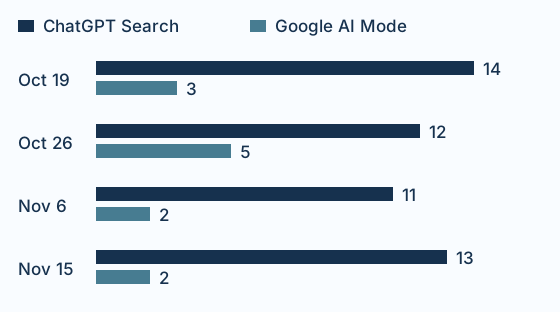
Across the four paired dates, the two engines shared zero exact citation URLs on the same date. We compared the stored URL strings as returned. Alternate URLs that resolve to the same page can count separately. On November 15, ChatGPT Search’s 13 citations included the Profound, Peec and OtterlyAI homepages. Google AI Mode’s two citations were Zapier’s tools roundup and Adobe’s Brand Visibility page. We opened the Zapier source through Parse; it was a comparison of nine tools. A reader investigating that answer now has a specific editorial page to inspect. Open the cited roundup.
This is why an agent evaluating software should ask for an answer, engine, date and exact URL together. The eight records illustrate the difference that choice makes for one question. They cannot establish a typical overlap rate, a winner among vendors, or the effect of a source on a model. The 62-row citation CSV includes the answer IDs, source positions and URLs so you can repeat the comparison. For a larger study of what cited pages say, see Parse’s claim and citation research.
Run a two-session trial before you buy
Give each candidate the same buyer question and specify the country, engines and dates. Run the first half in your own agent. Run the second in a fresh chat with access to the same workspace. This exposes a distinction that can be hard to see in a demo: a tool may retrieve a good answer once, while your teammate still needs a durable way to return to it.
First session: “Find a dated answer to this buyer question that recommends a competitor. Give me the question, engine, observation date, answer passage and exact source URL. Open the source and show what it says about the competitor. Save the evidence and one proposed next action in our test workspace. Tell me where you saved it.”
Second session: “Find the investigation we saved. Which answer and source did we inspect? What still needs checking? Give me a link or record ID I can open.” Record which steps the platform handled, which required a browser or outside task manager, and what each run cost. A dated source list may be all a reporting team needs. An agency handing work from a researcher to an editor should also be able to recover the finding without pasting the first conversation into the second.
If your primary job is collecting fresh answers to thousands of custom questions, compare the APIs for building an AI visibility monitor. If you already have a shortlist, use the AI visibility benchmark checklist to align the question sets and engines before comparing results.
If you want to know when AI changes its answer about your brand, start with a free brand check.