Virtual event platform for hybrid team all-hands
Data as of Oct 25, 2026 Reviewed by Dimitry Apollonsky
Which brands AI mentions




Mentioned in · Jul 8 – Oct 25, 2026
ChatGPT SearchChatGPT SearchGoogle AI ModeGoogle AI Mode


Widest split: Zoom Events, 45% on ChatGPT Search and 67% on Google AI Mode.
- =1Microsoft TeamsChatGPT Search 68%Google AI Mode 71%
- =1Zoom EventsChatGPT Search 45%Google AI Mode 67%
- =3WebexChatGPT Search 45%Google AI Mode 29%
- =3Webex EventsChatGPT Search 32%Google AI Mode 38%
- =3ZoomChatGPT Search 41%Google AI Mode 29%
Questions and answers
Google AI ModeOct 25, 2026
Handling an all-hands meeting for a hybrid team requires a balance: remote folks shouldn't feel like an afterthought, and in-person groups shouldn't feel like they're trapped in a giant Zoom room.
The best platform depends on your company size, existing tech stack, and how interactive you want the meeting to be. Top options categorized by your primary needs include:
- Microsoft Teams Town Hall — Best if you are already in the Microsoft 365 ecosystem. Many organizations already have enterprise-grade town hall and large-scale broadcasting infrastructure included in their existing plans at no extra cost, making it a frictionless choice for internal continuity.
- Zoom Workplace & Zoom Events — Best for a low learning curve. Zoom is universally familiar, and features like AI Companion (for automatic recaps) and specialized Zoom Rooms help bridge the gap between remote tiles and physical conference setups.
- Livestorm — Best browser-based all-in-one tool. It requires zero software downloads for attendees and excels at one-to-many presentations, robust live polling, and seamless on-demand replays.
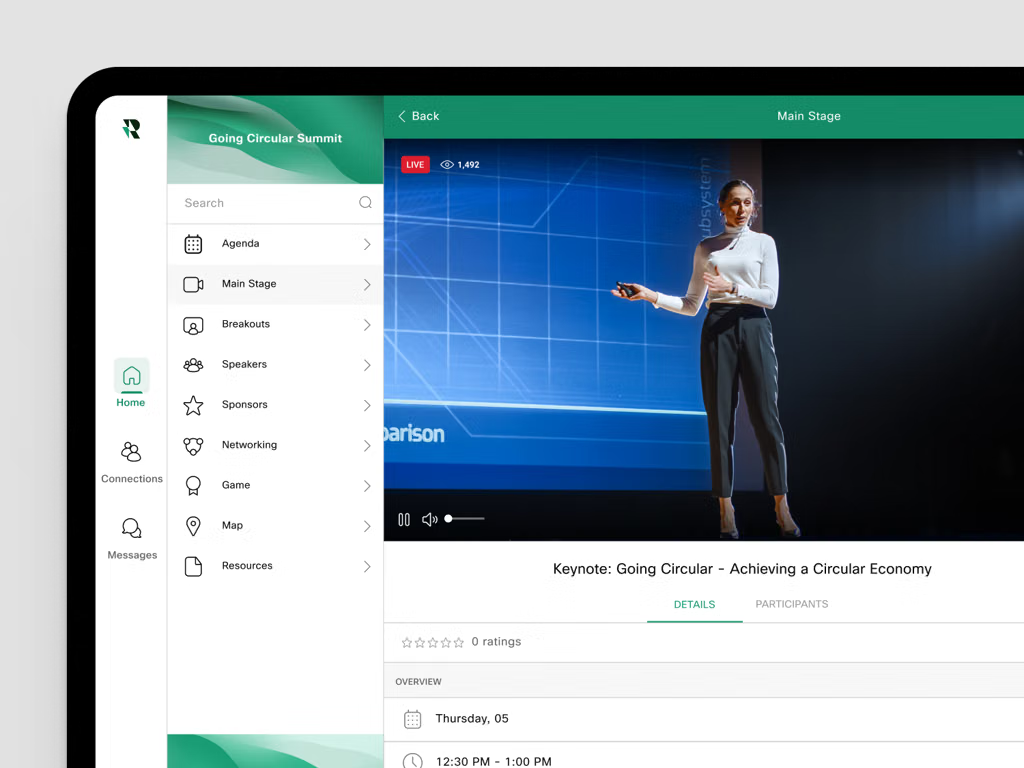
- RingCentral Events (formerly Hopin) — Best for high-engagement or multi-track scaling. If your all-hands involves heavy branding, breakout rooms, dedicated stage layouts, and interactive networking features for remote employees, RingCentral Events provides a comprehensive digital venue.
To help narrow down the best fit, could you share:
- Roughly how many employees attend your all-hands?
- What video conferencing tool (if any) your company already uses day-to-day?
- Do you need heavy interactivity (live Q&A, breakout rooms, polling) or is it mostly a broadcast/presentation format?
ChatGPT SearchOct 25, 2026
For a hybrid team, I’d recommend choosing a platform that makes all-hands meetings feel like a shared company event—not just a video call projected into a conference room.
My first choice would be Microsoft Teams Town Hall if your company already uses Microsoft 365, or Zoom if your team is already standardized on Zoom. Both support structured company-wide presentations, but the right fit depends on how interactive you want the meetings to be.
The best platforms to consider
1. Microsoft Teams Town Hall
(Best for Microsoft 365 teams)
Designed for leadership updates, company-wide announcements, moderated Q&A, and recorded presentations. Familiar for employees already using Teams, with attendee reporting and support for large audiences.
Watch out for: The standard town hall format is primarily broadcast-oriented; attendees generally can't turn on their own microphones or cameras.
Website:
2. Zoom
(Best for flexible participation)
Use Zoom Meetings for more conversational all-hands, Zoom Webinars for controlled presentations, or Zoom Events when you need an event hub and multiple sessions. Polls, Q&A, and recordings can help make recurring meetings more engaging.
Watch out for: Zoom Events may be more infrastructure than you need for a single recurring meeting.
Website:
3. Slido
(Best engagement add-on)
A strong option if your current video platform is fine but employees rarely participate. Add live polls, anonymous questions, question upvoting, and quizzes. Remote employees can participate alongside people in the room using a link or QR code.
Watch out for: Slido complements your meeting platform rather than replacing it.
Website:
4. Bizzabo
(Best for polished, large-scale events)
Worth evaluating if your all-hands are part of a bigger internal event program, with in-person venues, virtual attendance, event branding, and detailed reporting.
Watch out for: It may be unnecessarily complex and expensive for a straightforward monthly all-hands.
Website:
How I’d choose
If your main priority is… My recommendation Simple, recurring company updates Microsoft Teams Town Hall Interactive discussion and employee participation Zoom Meetings Better anonymous Q&A and live polling Slido alongside your existing platform A polished, multi-part company event Bizzabo or Zoom Events One important point: the platform alone won't fix a hybrid meeting. Use a room microphone and camera that capture everyone clearly, have a moderator monitor remote questions, and give remote employees equal opportunities to speak. Microsoft's hybrid-meeting guidance highlights these practical details.
Let’s narrow it down to the best fit
1. How many employees typically attend?
Under 100
100–250
250–1,000
Over 1,000
2. What tools does your company already use?
Microsoft 365 / Teams
Zoom
Google Workspace / Meet
Mixed tools / open to switching
3. What kind of all-hands do you want?
Mostly leadership presentations
Presentations plus live discussion and Q&A
Highly interactive, community-building events
4. What is the biggest problem today?
Remote employees feel left out
Low engagement and few questions
Poor audio, video, or logistics
Meetings feel boring or unstructured
Recordings, analytics, or follow-up
[Find our best-fit platform]
Sources cited in this answer13
- support.microsoft.comGet started with town hall in Microsoft Teams | Microsoft Support
- zoom.comBest Practices for Hosting Virtual All-Hands Meetings | Zoom
- support.zoom.comComparing Zoom Events and Webinars Plus event types
- learn.microsoft.comPlan for Teams events - Microsoft Teams | Microsoft Learn
- microsoft.comVideo Conferencing, Meetings, Calling | Microsoft Teams
- zoom.comZoom Events: Virtual Event Platform | Zoom
ChatGPT SearchOct 16, 2026
For a hybrid team, I’d shortlist platforms that do more than stream a video call: they should make it easy for remote employees to participate, give presenters good production controls, and keep in-person and virtual attendees equally involved.
The biggest decision is whether you need a straightforward company all-hands or a more polished, interactive event with audience engagement, multiple sessions, and hybrid production.
Virtual event platforms worth considering
1. Microsoft Teams Town Hall
(Best for Microsoft 365 teams)
Ideal for recurring company-wide updates, executive announcements, and employee Q&A. It integrates with the Microsoft ecosystem and supports structured, large-audience events.
Watch out for: A broadcast-style town hall is less interactive than a regular meeting, and some capabilities depend on licensing and event settings.
Explore:
2. Zoom Events
(Best all-round alternative)
A strong choice if employees already know Zoom and you want webinars, managed recordings, Q&A, polls, or a hub for recurring events. Zoom also offers simpler Meetings and standalone Webinars options, so you don't necessarily need the full Events product.
Watch out for: Compare license tiers, attendee capacity, and add-on costs before choosing a package.
Explore:
3. Cisco Webex Webinars
Best for large enterprises, globally distributed teams, and organizations with demanding security or multilingual-event requirements. Worth evaluating if you already use Cisco collaboration tools.
Watch out for: It may be more complex than you need for a routine monthly all-hands.
Explore:
4. Airmeet
Best for engagement-heavy all-hands where you want more than a one-way broadcast: moderated Q&A, polls, audience participation, and social interaction. Also worth considering for internal summits and employee engagement events.
Watch out for: Check how its attendee experience and pricing fit your team's size and event frequency.
Explore:
5. RingCentral Events
Best for polished internal events, quarterly kickoffs, and all-hands with multiple sessions, breakout experiences, or a more conference-like format.
Watch out for: It can be overkill if you only need a 45-minute leadership update every month.
Explore:
6. Vimeo
Best for high-production executive broadcasts where polished video, branded presentation, and reliable streaming matter more than live group discussion.
Watch out for: You may need a separate tool for employee interaction, such as Q&A, polls, or moderated discussions.
Explore:
How they compare
Platform Best use case Audience experience Setup effort Microsoft Teams Town Hall Regular internal updates Structured broadcast + Q&A Low if you use Microsoft 365 Zoom Events Flexible all-hands and recurring events Familiar, with polls and Q&A Low–medium Webex Webinars Large global or regulated teams Enterprise webinar experience Medium Airmeet Interactive employee events High engagement Medium RingCentral Events Multi-session company events Conference-style experience Medium–high Vimeo Enterprise Executive broadcasts Video-first, polished production Medium These are relative assessments, not vendor-published scores. Actual features, capacity, and costs depend on the plan and configuration.
What I would prioritize for a hybrid all-hands
- Remote employee inclusion: Remote attendees can submit questions, vote in polls, and participate without competing with people in the room.
- In-room production: Support for a room microphone system, multiple cameras, slides, and a dedicated moderator.
- Audience size: Confirm capacity for your largest expected event, not just your average attendance.
- Recording and accessibility: Easy replay, captions, and language support if your team is distributed globally.
- Administration: SSO, attendance reporting, access controls, and integrations with your existing calendar and collaboration tools.
- Total cost: Include premium licenses, attendee-capacity add-ons, event production, and any additional engagement tools.
For a typical internal all-hands, I'd start by comparing Teams Town Hall and Zoom. Add Airmeet if employee interaction is a major priority, or RingCentral Events if you're planning larger, multi-session events. Microsoft's documentation confirms that Teams has distinct interactive and large-audience event experiences, so select the format that matches how you want employees to participate.
Let’s narrow it down
A couple of details will help me recommend the best two or three options for your team.
1. How many people typically attend?
Under 200
200–500
500–2,000
2,000–10,000
Over 10,000
2. What tools does your company already use?
Microsoft 365 / Teams
Google Workspace
Zoom
A mix of tools
3. What kind of all-hands do you want?
Live presentation + moderated Q&A
Highly interactive, with polls and participation
Professional broadcast with studio-quality video
Full hybrid event with in-person and virtual networking
4. What's your budget preference?
Use an existing license if possible
Under $500/month
$500–$2,000/month
Enterprise budget for the right solution
[Recommend the best-fit platforms]
Sources cited in this answer14
- learn.microsoft.comOverview of meetings and events in Microsoft Teams - Microsoft Teams
- learn.microsoft.comPlan for Teams events - Microsoft Teams
- zoom.comBest Practices for Hosting Virtual All-Hands Meetings | Zoom
- learn.microsoft.comOverview of meetings and events in Microsoft Teams - Microsoft Teams
- virtualvelocity.comWebex vs Zoom vs Teams: Choosing the Right Platform for Your Next Virtual Event | Virtual Velocity
- airmeet.comBest Webinar Platforms for Town Halls and Staff Meetings 2026
Google AI ModeOct 16, 2026
Hosting an all-hands meeting for a hybrid team requires a platform that bridges the gap between remote workers and those sitting together in a physical office . Depending on your company size, tech stack, and budget,
several top virtual event and communication platformsfit different needs.- Zoom Events — Best for familiarity and ease of use. If your team already uses Zoom daily, extending to Zoom Events or Zoom Webinars is the path of least resistance. It features robust production controls, Q&A, polling, and AI companion features for summaries, making it seamless for employees who don't want to learn a brand-new interface.
- Microsoft Teams — Best for Microsoft 365-native organizations. If your company lives in Teams for daily communication, its town hall and webinar features allow you to scale up securely. It includes live transcription, robust breakout capabilities, and deep integration with office hardware via Teams Rooms.
- Cisco Webex — Best for high-security and enterprise compliance. Webex Webinars and Events provide enterprise-grade reliability and crystal-clear audio/video performance even on constrained bandwidth, making it a favorite for regulated industries like finance, healthcare, and government.
- Bizzabo — Best for heavy branding and large enterprise portfolios. If your all-hands doubles as a massive company-wide annual kickoff with high production value, customized registration, and deep data analytics, Bizzabo's Event Experience OS provides a polished, professional finish.
- MeetingPulse — Best as an interactive engagement layer. If you are already happy with your video broadcast (like Zoom or Teams) but want better crowdsourced Q&A, anonymous feedback, interactive polling, and brainstorming tools to keep both in-room and remote staff engaged, MeetingPulse layers directly on top of your existing video stack.
To help narrow down the best choice, tell me:
- What is your approximate team size?
- What video conferencing tool (if any) do you currently use day-to-day?
- Do you need advanced interactive features like anonymous Q&A and live polling?










Also asked as
- What are the best virtual event platforms for hosting all-hands meetings when you have a hybrid workforce?

