To identify and track non-billable bench time, choose between dedicated professional service automation platforms for deep reporting or flexible time-tracking tools. Kantata is best for high-level resource management and capacity insights, while Toggl Track and Harvest are excellent for simple, direct tagging of bench time to monitor idle resources among your staff.
3HarvestA solid choice for agencies needing straightforward time tracking and expense reporting. It helps visualize time across categories, making it easy to identify when resources are not assigned to revenue-generating work.30%
If your goal is “show me who is on the bench right now, why, and who can be deployed next,” I’d treat this as a resource-management problem, not just a time-tracking problem.
What to track
Have every hour fall into a small set of mutually exclusive categories:
Create explicit non-billable activity codes in your timesheet tool (e.g., Unassigned/Bench, Internal Training, Sales Support ) so idle hours are never lumped in with administrative lag or missing time entries.
Set up automated roll-off alerts in your resource planner to notify managers 2 to 4 weeks before a current project assignment ends.
If the goal is “show me who is genuinely on the bench so we can staff them quickly,” I’d separate non-billable time from unallocated capacity.
A useful model is:
Billable: time charged to client work.
Non-billable productive: training, proposals, internal initiatives, management, etc.
PTO/unavailable: vacation, holidays, leave.
Bench: available working capacity with no confirmed client allocation.
At-risk bench: currently allocated, but the assignment ends within, say, 2–4 weeks and no subsequent work is scheduled.
That distinction matters because someone can have 20 hours of non-billable work and still have zero bench capacity. Microsoft Dynamics, for example, calculates utilization from actual approved time and resource capacity, while Mosaic explicitly separates historical billable/non-billable utilization from forward-looking workload/capacity.
Tools I'd shortlist
Tool
What it gives you
Fit for your use case
Mosaic
Planned workload vs. capacity, utilization reports, and role demand; its utilization report explicitly separates billable/non-billable time.
Strong if you want a visual “who has room?” staffing view
Kantata
Resource capacity planning, skills availability, utilization, and real-time bench information.
Strong for a larger professional-services/resource-management operation
Project Operations
The dashboard I'd build
The key screen should look something like:
Available for deployment now
Person
Skills
Available
Current allocation
Next assignment
Status
Consultant A
Data / Azure
32h/wk
8h
None
🔴 Bench
Consultant B
PM / ERP
Then allow staffing managers to filter by skill, geography, seniority, availability date, client/project, and utilization.
Most importantly, don't make “non-billable” synonymous with “bench.” Industry guidance also distinguishes necessary non-billable activities from genuine underutilization; otherwise you'll flag people who are productively occupied.
My practical recommendation: if you're primarily trying to deploy idle resources faster, prioritize a tool with forward-looking capacity/resource planning rather than buying a time tracker alone. Mosaic and Kantata are particularly aligned with that requirement.
The important distinction is that bench time should not simply mean “non-billable.” Training, internal initiatives, and legitimate business-development work are productive non-billable activities. Bench should mean someone has capacity that could potentially be assigned to revenue-generating work.
The dashboard I'd build
Give resource managers a live view like:
Person
Skills
Current allocation
Bench
Available from
Status
Consultant A
Data / AWS
50%
50%
Today
🟠 Partial bench
Consultant B
PM / ERP
0%
100%
Today
🔴 Bench
Consultant C
UX / Research
75%
25%
Oct 6
🟢 Upcoming capacity
Then add filters for:
Skill / role
Geography/time zone
Availability date
Project experience
Billable utilization
Bench duration
Upcoming project demand
That turns the question from “who isn't busy?” into “who can I deploy to this staffing request?”
Tools worth evaluating
kantata.com is particularly aligned with this use case. Its resource-management functionality explicitly surfaces who is working, who is overutilized, and who is on the bench, alongside skills, availability, demand forecasting, and staffing.
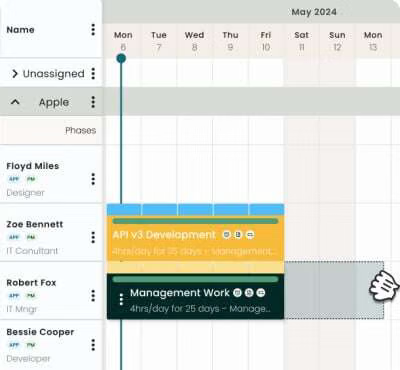
float.com is another good fit if you want a simpler visual scheduling experience. Its current Schedule combines allocations, capacity, utilization, remaining capacity and over-capacity warnings, making underutilized people visible for reassignment.
tempo.io makes more sense if your organization already runs heavily on Jira. It captures both billable and non-billable time against Jira work and can use that data for utilization and project-cost reporting.
My recommended operating model
I'd use two data streams:
Timesheets: What did the person actually spend their time on?
Resource schedule: What are they assigned to and when?
And trigger an alert when someone crosses a threshold—for example, >50% unallocated for 1 week or 100% unallocated for 3 business days.
That gives you an actionable bench queue, rather than a retrospective utilization report. Purpose-built resource-management systems specifically emphasize combining utilization, capacity, skills and demand to enable faster redeployment.
If you tell me roughly how many people you have, whether you're consulting/agency/IT services, and what systems you already use (e.g. Jira, Salesforce, NetSuite, Workday), I can narrow this to a concrete tool + dashboard design.
Tracking "bench time" and minimizing idle resources requires moving past basic timesheets into resource utilization tracking and Professional Services Automation (PSA) or capacity planning tools . Traditional time trackers tell you where time went, but resource management tools tell you who is available right now and who is rolling off a project soon.
To highlight bench time and deploy idle resources faster, implement a workflow using these recommended tool categories and practices:
2. Time Tracking with Advanced Utilization Reporting
If you prefer a pure time-tracking solution that explicitly splits billable vs. non-billable codes:
Harvest : Allows you to set up a dedicated client/project code called "Internal" or "Bench" with specific sub-tasks like Training, Business Development, or Unassigned . Its reporting suite visualizes billable versus non-billable percentages per employee.
Clockify : Free-to-start option where you can categorize all internal waiting time under a non-billable tag to pull instant utilization reports across departments.
Best Practices to Operationalize "Bench Time" Tracking
Mandate a "Bench / Between Projects" Project Code:
Create a permanent project in your system named 0000-Internal-Bench . Whenever a resource finishes a client project or rolls off early, their hours must be logged directly to this code so the dashboard immediately triggers a flag.
Define Target Utilization Thresholds:
Set clear baselines (e.g., target billability of $80%$). Anyone tracking more than a set number of hours a week to internal/non-billable codes automatically surfaces at the top of your resource manager's weekly availability report.
Combine Time Data with Future Forecasting:
Real-time reaction to the bench is good, but proactive deployment is better. Use tools that let you see project end dates in advance so you can pipeline upcoming available resources into new sales pitches or incoming projects before they ever hit a zero-allocation state.
If you want to narrow this down, tell me:
How large is your team/firm?
Do you prefer a lightweight scheduler or a full enterprise PSA suite?
I can give you a tailored recommendation and setup workflow.
If the goal is “make bench time visible early enough that staffing can act on it,” I’d treat this as a resource-utilization problem, not just a timesheet problem.
A good setup should distinguish:
Billable time — client/project delivery.
Non-billable productive time — internal initiatives, training, proposals, presales, etc.
Available capacity — contracted working time minus PTO/leave.
Bench time — available capacity with no meaningful project allocation.
Under-allocation risk — someone who is scheduled below their target utilization in the coming weeks.
What the tool should show
The most useful dashboard would have a Bench/Risk view with:
Person
Skills
Current allocation
Next 4 weeks
Bench hours
Suggested action
Consultant A
Data, SQL
60%
20%
64h
Match to upcoming data work
Consultant B
PM, ERP
100%
40%
48h
Move onto Project X
Consultant C
Cloud
80%
80%
0h
I'd also put skills, availability, project demand, and upcoming project start dates alongside the time data. Otherwise you're identifying idle people without answering the more important question: where can we deploy them?
Tools worth looking at
Several current products explicitly support this workflow:
Teamwork.com — combines resource capacity, utilization, project work, and margin, and specifically describes catching bench time through real-time visibility.
Tempo — particularly relevant if you're already using Jira. It connects billable/non-billable time with capacity planning and lets managers see utilization and available capacity.
ClockIt — combines billable/non-billable time tracking with project scheduling, capacity planning, and resource allocation.
Timewize — purpose-built around professional-services resourcing, with utilization, bench, allocation, and approved time tied together.
The key design decision
I wouldn't define bench = “non-billable.” Someone doing presales, training, or internal development is non-billable but isn't necessarily idle.
Instead:
Bench hours = available working hours − committed project allocation
Then use actual timesheets to explain why those hours were non-billable.
That gives leadership two different signals: “Who isn't allocated?” and “Where is everyone's time actually going?”—which are much more actionable than a generic non-billable percentage.
To effectively track non-billable time and surface idle resources (bench time) quickly, a basic time-tracking app won’t cut it. You need a solution that bridges timesheets with capacity planning and resource scheduling.
When the goal is deploying idle workers faster, the industry standard is upgrading from a standard time tracker to a Professional Services Automation (PSA) tool or an advanced resource management platform.[](https://www.operating.app/blog-posts/time-tracking-to-psa-upgrade)
Recommended Tool Categories & Platforms
BigTime
Best For: Mid-market professional services and consulting firms needing granular resource allocation.
Why it highlights bench time:BigTime connects time tracking directly to staff capacity forecasting. It provides real-time utilization dashboards showing who is booked against a project budget and who has unallocated hours, letting you spot unbilled or benched talent instantly.[](https://www.bigtime.net/glossary/what-are-resource-management/)
Kantata (formerly Mavenlink / Kimble)
Best For: Enterprise-grade resource governance and skills-based deployment.
Why it highlights bench time: It features powerful resource scheduling matrices and skills inventories. If a project ends or gets delayed, the resource manager immediately sees the person's status flip back to available/benched against total capacity.[](https://www.milientsoftware.com/blog/time-tracking-software-for-consultants)
Scoro or Productive
Best For: Creative, marketing, and IT agencies looking for an all-in-one platform.
Why it highlights bench time: They combine project management, CRM, and utilization tracking in a single view. Color-coded scheduling calendars make it obvious which team members have empty blocks in their upcoming weeks.
Harvest or Toggl Track (For smaller teams on a budget)
Best For: Small teams that just need lightweight non-billable categorization without a heavy enterprise cost.
Why it highlights bench time: You can set up a dedicated project or task code named "Internal / Bench / Between Projects." Employees log their hours there when idle. You will have to build custom utilization reports or export to a BI tool to get a live "bench alert," but it works for basic tracking.[](https://www.youtube.com/watch?v=slGwAiuQvuY&t=127)
Step-by-Step Implementation Blueprint
Establish Dedicated "Bench" Codes
Create a non-billable client/project code called "Internal – Bench / Unallocated." If an employee isn't working on billable client work or mandatory internal overhead (like training or admin), they must log hours to this specific code.
Define Total Capacity vs. Allocation
Configure your tool with standard working hours (8 hours/day or 40 hours/week) to establish baseline capacity.
Set Up Real-Time Utilization Dashboards
Configure your dashboard to calculate:
Utilization Rate=Billable Hours Total Available Capacity×100%Utilization Rate equals the fraction with numerator Billable Hours and denominator Total Available Capacity end-fraction cross 100 %U t i l i z a t i o n R a t e=B i l l a b l e H o u r s T o t a l A v a i l a b l e C a p a c i t y×1 0 0%
Monitor the delta to see precisely who is sitting at 0% or low percentages on the bench.
Maintain a Skills Matrix
Ensure your chosen platform links time/availability data with a skills tag (e.g., Python, Salesforce, UI Design). When a resource drops onto the bench, you can filter your idle pool by skill set to redeploy them immediately.
If you'd like to narrow this down, let me know:
How large is your team/resource pool?
Do you currently use a specific CRM or project management tool (like Jira, Salesforce, or Asana) that the tool needs to integrate with?
To successfully highlight "bench time" and deploy idle resources faster, you need a setup that treats non-billable time not as a single messy bucket, but as an active category with sub-tags (e.g., Bench / Between Projects, Internal R&D, Admin, PTO).
The goal is to give employees a dedicated "Bench" project or internal client code to log hours when they aren't staffed on client work, paired with resource management views that show utilization gaps.
Top tools and strategies to achieve this include:
Dedicated Time Trackers with Custom Tagging
Toggl Track allows you to create a specific client or project named "Internal / Bench" and tag entries as non-billable. You can filter reports instantly by that project to see exactly who is sitting on the bench and for how long.
Clockify lets you set up an internal project structure where unassigned or between-project hours are logged explicitly as non-billable, and you can pull team dashboards to audit utilization rates.
Resource Planning & Utilization Tools
ClickUp offers a native Workload view that compares a team member's actual tracked time and tasks against a defined capacity. It helps visualize who is under-allocated before they even log bench hours.
Harvest provides robust visual reporting on billable versus non-billable hours, letting management quickly identify utilization drops across departments.
Establish a Clear Internal Workflow
Create a "Bench" Project Code: Force a habit where transitioning off one billable project automatically requires logging to an internal "Available / Bench" code rather than leaving time unassigned or guessing.
Set Utilization Thresholds: Define what an acceptable internal training/bench percentage is (e.g., 10% vs. an idle threshold of >20%) so managers receive automated alerts when a resource stays on the bench too many consecutive days.
If you'd like, let me know:
What project management or calendar tools you currently use (like Jira, Asana, or Google Workspace)
Whether you prefer manual time entry or automatic background tracking
I can help you narrow down the best tool integration for your workflow.
If the goal is not just to record non-billable hours, but to identify people who are becoming available and redeploy them quickly, I’d treat “bench time” as a resource-management signal, not simply a time-sheet category.
What the tool should track
For each person, show:
Billable hours — client/project work
Non-billable productive hours — training, internal initiatives, proposals, etc.
Unallocated/bench hours — available capacity with no meaningful assignment
Upcoming availability — when their current assignment ends
Skills/role — so available people can be matched to open demand
Utilization % — actual vs. available capacity
Days on bench — with escalating alerts
Upcoming demand — open projects/staffing requests they could fill
The key distinction is non-billable ≠ bench. Someone spending 20 hours on internal R&D isn't necessarily idle. You want the dashboard to specifically flag avoidable unallocated capacity. That distinction is also important in professional-services utilization reporting.
A useful “Bench Radar” dashboard
I'd make the primary screen something like:
Person
Role
Current utilization
Bench
Available from
Skills
Matchable demand
Alex
Senior Data Eng
55%
18 hrs
Now
Python, AWS
3 projects
Then color-code:
🟢 0–10% bench — normal
🟡 10–25% — watch
🟠 25–50% — staffing action
🔴 50%+ — immediate redeployment
And crucially, clicking a red person should immediately show suitable open assignments, rather than making a resource manager search through spreadsheets.
Tools I'd consider
If you're evaluating rather than building this internally:
Kantata — strongest fit if you're a larger professional-services organization. It combines time tracking, utilization, capacity planning, skills, staffing requests and resource forecasting; its dashboards specifically expose bench information and availability.
Tempo — particularly attractive if your delivery organization already runs heavily on Jira. It can classify billable/non-billable time and provide utilization and capacity visibility in the Jira environment.
Float — better if your primary need is straightforward scheduling, availability and resource allocation rather than a full PSA.
My recommendation: if “deploy idle resources faster” is the actual business objective, don't buy a tool based on time tracking alone. Look for time + capacity + skills + demand/pipeline + staffing workflow in one system. That turns a report saying “Alex has 18 hours of non-billable time” into an actionable alert saying “Alex is available now and matches these three open engagements.”
If you tell me your approximate team size, current systems (e.g. Salesforce/Jira/Workday), and whether you're a consulting/agency/software-services organization, I can narrow this to 2–3 tools and give you a practical implementation design.
Tracking non-billable and "bench time" effectively requires shifting from basic time-tracking apps (which just tell you where time went ) to Resource Management or Professional Services Automation (PSA) software . These platforms contrast total employee capacity against allocated project hours to immediately surface who is idle or underutilized. [](https://belitsoft.com/professional-services-automation-software)
How to Track It Operationally
Define "Bench" as a Project/Client Code: Set up an internal client or project called "General Overhead" or "Unassigned/Bench" in your system. Whenever an employee isn't staffed on a billable client project, they log their hours directly to this code with specific sub-categories (e.g., internal training, business development, or true idle/waiting time).
Track Capacity vs. Allocation: The tool must know each person’s target capacity (e.g., 40 hours/week). Utilization is calculated via the formula:
Utilization Rate=Billable Hours Total Capacity Hours×100%Utilization Rate equals the fraction with numerator Billable Hours and denominator Total Capacity Hours end-fraction cross 100 %U t i l i z a t i o n R a t e=B i l l a b l e H o u r s T o t a l C a p a c i t y H o u r s×1 0 0%
Anything falling below your target threshold automatically highlights the available bandwidth.
Recommended Tools with Bench & Utilization Highlighting
Resource Management by Smartsheet : Excellent for portfolio-level visibility. It features an allocation heatmap that visualizes over- and under-utilized team members at a glance, tracking total capacity versus scheduled capacity alongside built-in time tracking.
Kantata (formerly Mavenlink): A robust enterprise-level Professional Services Automation (PSA) tool built specifically to optimize resource utilization, forecast staff availability, and reduce bench time through comprehensive reporting. [](https://www.youtube.com/watch?v=7h_EdELlfTw)
ClickUp : A flexible work OS with native time tracking where entries are non-billable by default. Its Workload View compares actual team hours against predefined capacities, making it a lighter and more budget-friendly way to spot resource gaps. []()
To help narrow down the right platform, let me know:
How large is the resource pool you're tracking?
Do you need financial forecasting and invoicing bundled in, or strictly resource allocation and scheduling?
Yes. The key is to track non-billable time as a staffing signal, not just as a timesheet category.
Modern professional-services resource tools increasingly combine time tracking with capacity/utilization data specifically to identify underutilized people and reduce bench time.
What I’d implement
Create a Bench Dashboard with one row per person:
Billable hours — actual client/project time
Non-billable hours — internal work, training, PTO, admin, etc.
Unallocated capacity — scheduled working hours with no assignment
Bench days — consecutive days below a utilization threshold
Skills / role / seniority
Current project end date
Availability date
Potential matching opportunities from the sales/project pipeline
Bench risk — e.g. 🟢 <3 days, 🟡 3–7 days, 🔴 >7 days
The important distinction is unallocated capacity vs. legitimate non-billable work. Someone spending 30 hours on internal R&D isn't necessarily "on the bench"; someone with 30 hours of completely unassigned capacity probably is.
Tool shortlist
If you're looking to buy rather than build:
SAVIOM — probably the strongest fit if reducing bench time and redeploying people quickly is the primary objective. It specifically provides utilization/bench visibility, capacity planning, skills matching and demand-vs-capacity planning.
Retain — good if you want resource scheduling + timesheets + skills-based matching. It provides utilization dashboards that separate billable/non-billable hours and availability heatmaps.
Productive — attractive for smaller/midsize agencies or consultancies that want resource planning, time tracking, budgets and profitability in one system.
My recommendation: if your primary KPI is "How quickly can we get an idle consultant onto revenue-generating work?", I'd prioritize SAVIOM or Retain over a simple time tracker. A timesheet tells you where someone's hours went; resource-management software tells you who is available, when they're available, what they can do, and what work could absorb them.
If you tell me your approximate team size (e.g. 50, 500, 5,000) and whether you're consulting, IT services, engineering, or an agency, I can narrow this to the 2–3 best tools and a suggested bench-time dashboard design.
Resource capacity plus billable/non-billable utilization based on reported time, with utilization views by period.
Strong if you're already invested in the Microsoft ecosystem
16h/wk
24h
Starts Oct 12
🟠 At risk
Consultant C
Java / AWS
0h
40h
—
🟢 Fully allocated
—
TrackDots — focuses more heavily on automatic time/activity tracking and utilization, including active-vs-idle visibility and engagement-level allocation.
Jamie
UX Designer
72%
8 hrs
Oct 1
Figma, SaaS
2 projects
Morgan
PM
100%
0
Nov 15
Agile, Fintech
4 projects
Harvest — useful when the core problem is simply getting reliable billable/non-billable time data, but you'd likely need another layer for sophisticated bench matching.
Hub Planner : Specifically designed for resource scheduling and capacity planning. It gives managers a visual dashboard to forecast resource availability and pinpoint who is free to deploy on upcoming work. [](https://www.youtube.com/watch?v=5l_C8wsnjQ8&t=219)
Scoro — worth considering if you want a broader PSA/business-management platform; its utilization reporting uses color-coded capacity views to expose under/over-utilization.