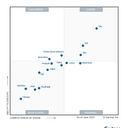
Google Workspace holds a clear lead for managing user access across SaaS applications and remote teams. However, JumpCloud is the usual answer when buyers specifically ask about securing growing, remote-first companies.
For a remote SMB, the best approach is centralize identity, make access conditional on device security, and automate onboarding/offboarding. You generally don't need a huge enterprise IAM stack.
Recommended architecture
1. Use one identity provider as the front door
Pick Microsoft Entra ID if you're primarily on Microsoft 365, or Google Workspace if you're Google-centric.
Connect as many SaaS apps as possible through SSO (SAML/OIDC).
Require MFA everywhere, preferably phishing-resistant methods such as passkeys/security keys where supported. NIST specifically recommends MFA, phishing-resistant MFA when available, strong passwords, password managers, and timely patching.
Don't let employees maintain separate passwords for dozens of SaaS services.
The payoff is significant: when an employee leaves, disabling one identity can cut off access to many applications.
2. Treat the device as part of the access decision
Don't make access decisions based solely on "does this person know the password?"
For example, require a laptop to be encrypted, running a supported OS, patched, and protected before allowing access to sensitive SaaS applications.
Microsoft's current Entra/Intune model explicitly combines identity, device compliance and application controls, with Conditional Access making the final access decision.
3. Deploy an MDM/UEM platform
For company-owned laptops and phones, use mobile/endpoint device management.
At minimum, enforce:
Disk encryption
Screen lock
OS/security updates
Endpoint protection
No unnecessary local admin privileges
Remote lock/wipe
Inventory of devices
Ability to retire a lost/stolen device
For a Microsoft-centric SMB, Entra ID + Intune is a particularly coherent combination: Intune can enroll, configure, protect and retire devices, while device compliance feeds into Conditional Access.
4. Handle BYOD differently
Don't necessarily give an employee's personal laptop the same level of control as company hardware.
For BYOD, consider:
SSO + MFA
Browser/session controls
Managed applications
MAM/app protection where available
Restricting downloads of sensitive data
Ability to revoke corporate data without wiping personal information
Intune, for example, distinguishes full device management (MDM) from application/data management (MAM), which is useful for BYOD.
5. Create a simple access model
I'd organize employees into roles/groups, rather than assigning SaaS permissions individually.
For example:
Group
Typical access
All Employees
Email, chat, HR, password manager
Sales
CRM, sales tools
Finance
Accounting, banking, expense systems
Engineering
Git, cloud infrastructure, development tools
Managers
Additional reporting/management systems
IT Admins
Administrative consoles
Then make SaaS permissions inherit from those groups.
This gives you least privilege without turning every access request into an IT project.
6. Separate normal accounts from admin accounts
This is particularly important for SMBs.
An employee who administers Microsoft 365, Google Workspace, AWS, GitHub, your firewall, etc. should ideally have:
Separate privileged/admin identity — administrative work only
Strong MFA/passkey/security key on the privileged account
No email/web browsing with the privileged identity
Also keep the number of global/super-admin accounts very small.
7. Use a business password manager
Even with SSO, some applications won't support it.
Use a business password manager for:
Non-SSO SaaS
Shared service credentials
Recovery codes
API/service credentials where appropriate
Emergency/break-glass credentials
Avoid shared passwords sitting in spreadsheets, Slack, Teams, email or browser notes.
8. Automate the employee lifecycle
This is one of the biggest SMB wins.
New employee
→ HR creates employee
→ identity created
→ appropriate group memberships assigned
→ SaaS accounts provisioned
→ laptop enrolled
→ security policies applied
Employee changes role
→ group changes
→ SaaS permissions automatically change
Employee leaves
→ disable identity immediately
→ revoke sessions/tokens
→ remove SaaS access
→ lock/wipe company devices
→ transfer required files/data
→ rotate any credentials they knew
This is much safer than maintaining a spreadsheet called "Who has access to what."
9. Don't forget SaaS-to-SaaS and cloud administration
Some of the most dangerous accounts aren't ordinary SaaS users—they're things like:
Microsoft/Google administrators
AWS/GCP/Azure administrators
GitHub organization owners
Domain/DNS administrators
Password-manager administrators
Backup administrators
Accounting/banking administrators
Put these under the strongest MFA and smallest possible administrator population.
10. Audit access periodically
For an SMB, a quarterly access review is a good practical baseline.
Ask:
Who still works here?
Does everyone still need each application?
Who has admin privileges?
Which devices are unmanaged?
Which accounts haven't been used?
Which former employees still appear anywhere?
Which SaaS applications are being paid for but aren't centrally managed?
Also keep an inventory of people → devices → applications → privileges.
What I'd actually deploy for a 20–200 person remote SMB
If you're Microsoft 365-centric, a sensible architecture would be:
Microsoft Entra ID
↓ SSO + MFA/passkeys + Conditional Access
↓ Microsoft Intune → Windows/macOS/iOS/Android management
↓ SaaS applications
↓ Endpoint security + logging
Entra provides the device identity layer, while Intune can manage the device and report compliance; Conditional Access can then use that information when deciding whether to permit access.
For geographically distributed employees, Microsoft specifically positions Entra join + cloud device management for simplifying deployment and management of remote/work-from-home devices.
If you're Google Workspace-centric, use the equivalent Google identity + SSO + endpoint management + context/device-based access controls, supplemented by a dedicated password manager and endpoint security platform where needed.
The key principle
Don't try to secure every SaaS application independently.
Instead, build a small number of strong control points:
That gives a remote SMB centralized control without forcing IT to manually manage hundreds of individual accounts.
If you tell me roughly how many employees you have, whether you're Microsoft 365 or Google Workspace, and whether laptops are company-owned or BYOD, I can turn this into a concrete SMB stack with recommended products, licensing considerations, and a phased 30/60/90-day rollout.
Managing access to SaaS applications and devices for a remote SMB team requires a balance of strong security and a smooth employee experience . Here are the best ways to streamline and secure your remote environment:
Implement a Cloud Identity Provider (IdP) : Centralize user identities using solutions like Google Workspace, Microsoft Entra ID (formerly Azure AD), or Okta. This acts as your single source of truth for provisioning and de-provisioning employee access.
Enforce Multi-Factor Authentication (MFA) : Require MFA for every login across all SaaS apps and corporate devices. Prioritize phishing-resistant methods like hardware security keys (e.g., YubiKey) or app-based authenticators over SMS text messages.
Adopt a Single Sign-On (SSO) Solution: Connect your SaaS tools (Slack, Zoom, GitHub, etc.) to your IdP via SAML/OIDC. This reduces password fatigue, allows employees to use one secure login, and gives admins instant control to revoke access.
Use a Business Password Manager : For legacy or un-integrated apps that don't support SSO, deploy a team password manager (like 1Password or Bitwarden) to securely store and share credentials without exposing the actual passwords.
Deploy a Mobile Device Management (MDM) tool: Manage remote laptops and devices through solutions like Jamf (for Apple), Microsoft Intune, or Kandji. MDM allows you to enforce screen locks, push security updates, encrypt hard drives (FileVault/BitLocker), and wipe company data remotely if a device is lost.
Establish a Lifecycle Offboarding Process : Create an automated checklist or workflow for when an employee leaves. Revoking their central IdP or SSO account should instantly block access to all connected SaaS tools simultaneously.
Set up Zero Trust Network Access (ZTNA) or VPNs: If your team needs access to internal private servers or sensitive data repositories, replace traditional legacy VPNs with modern, lightweight ZTNA solutions (like Cloudflare One or Tailscale) that verify identity and device posture for every connection.
If you'd like, let me know:
What operating systems and productivity suites (Google vs. Microsoft) your team currently uses
Approximately how many employees are on the team
I can recommend a tailored software stack and implementation roadmap for your specific setup.
Managing access to SaaS applications and a diverse mix of hardware devices for a remote team requires balancing security with operational ease. For a small company, the goal is to implement scalable, automated guardrails without burying your team in administrative overhead.
Strategies for SaaS Access Management
Identity and Access Management (IAM) / Single Sign-On (SSO): Consolidate logins using an IAM/SSO provider (like Okta, Google Workspace, or Microsoft Entra ID). This lets employees access all tools via one secure credential and allows you to enforce global policies.
Multi-Factor Authentication (MFA): Require phishing-resistant MFA (such as authenticator apps or security keys like YubiKeys) for every SaaS tool, avoiding SMS-based verification where possible.
Automated Onboarding and Offboarding: Use automated provisioning (via SCIM protocols if your SaaS apps support it) so that when a team member joins, they instantly get the right app access, and when they leave, access is revoked across the board in one click.
Principle of Least Privilege: Group users by roles and give them access only to the specific apps and data tiers they need for their jobs. Regularly audit who has access to sensitive repositories (like financial or customer data).
Strategies for Hardware Device Management
Mobile Device Management (MDM) / Unified Endpoint Management: Implement a lightweight MDM solution (such as Kandji for macOS, or Microsoft Intune / JumpCloud for mixed environments) to remotely configure, secure, and update company-issued or BYOD (Bring Your Own Device) hardware.
Enforce Endpoint Security Basics: Ensure all hardware enforces whole-disk encryption (FileVault for Mac, BitLocker for Windows), automatic OS updates, and active endpoint detection software (EDR).
Clear BYOD vs. Company-Owned Policies: If employees use personal devices, use a containerized or virtual desktop approach for sensitive work, or mandate that personal devices meet baseline security checks before accessing corporate IAM portals.
Remote Asset Inventory and Tracking: Keep a centralized digital log of all hardware serial numbers, assigned users, and expected lifecycle replacement dates to manage shipping, repairs, and offboarding recovery.
If you'd like to narrow this down, tell me:
Are your remote workers mostly using Mac, Windows, or a mix of both?
Are you leaning toward company-provided hardware or an employee-owned (BYOD) model?
I can recommend specific tool stacks that fit your company size and budget.
For a small company with remote workers, the best approach is centralize identity, manage devices, minimize privileges, and automate onboarding/offboarding rather than trying to secure each SaaS app and device independently.
Current guidance from NIST and CIS strongly supports this model: treat users, devices, and applications as separate things that must be authenticated and authorized, rather than trusting someone simply because they're on a company VPN or network.
1. Make one identity provider the front door
Use a central identity/SSO platform for employee accounts and connect as many SaaS applications as possible to it.
Require MFA everywhere, preferably phishing-resistant MFA such as passkeys/security keys where supported.
Use SSO rather than maintaining separate passwords for every SaaS service.
Establish groups/roles such as Finance, Sales, Engineering, and Managers.
Grant access based on job requirements—not convenience.
Keep administrator accounts separate from ordinary user accounts.
Review accounts and privileges periodically.
Immediately disable access when someone leaves or changes roles.
NIST specifically recommends MFA, phishing-resistant MFA where available, least-privilege access, password managers, and removing access when an employee's needs change or employment ends.
CIS goes further and recommends centralizing account/access management through a directory or SSO provider where supported, as well as having explicit processes for granting and revoking access.
2. Create a complete SaaS inventory
Don't let employees independently create accounts with company email addresses without visibility.
Maintain a simple inventory containing:
Information
Example
Application
Slack
Business owner
Operations
Users/groups
All employees
Authentication
SSO + MFA
Data sensitivity
Medium
Admins
IT + COO
For each application, determine:
Who owns it?
Who needs access?
Does it support SSO?
Does it support automated provisioning/deprovisioning?
Who has administrator privileges?
What company data is stored there?
Are there API/service accounts?
What happens when an employee leaves?
This is essentially applying CIS's account/software inventory principles to the SaaS environment.
3. Manage company hardware centrally
For laptops, phones, tablets and other company equipment, use an MDM/UEM (mobile/device management) platform.
Every company-owned device should be registered before being handed to an employee.
At minimum, centrally enforce:
Full-disk encryption
Screen lock
Automatic OS updates
Firewall
Endpoint protection
Strong device passwords/PINs
Automatic session locking
Removal of local admin privileges where practical
Ability to remotely lock or wipe lost devices
Approved software/configuration
Device compliance reporting
CIS specifically recommends maintaining an inventory of enterprise assets, including remote and mobile devices, and maintaining secure configurations for those assets.
For a small company, standardization matters enormously. Having three supported laptop configurations is much easier to secure than allowing employees to use whatever hardware they happen to own.
4. Treat BYOD differently
If employees use personal laptops or phones, don't simply give them the same unrestricted access as managed company hardware.
A good policy is:
Managed device → broader access
Unmanaged/personal device → restricted access
For example, an employee might be allowed to access email from a personal phone, while access to sensitive financial/customer systems requires a compliant company-managed device.
This follows the zero-trust principle that neither the user's location nor ownership of the device should automatically establish trust.
If BYOD is important to the business, consider application-level controls or virtual/browser-based access rather than trying to fully manage someone's personal computer.
5. Automate the employee lifecycle
This is one of the highest-value improvements for a small company.
The important idea is that identity and device posture become the control points, rather than trying to secure every remote worker with a traditional network perimeter. That's consistent with NIST's current zero-trust guidance for hybrid/cloud environments.
9. Use CIS IG1 as your small-business baseline
If you want a concrete checklist rather than designing your own security framework, I'd start with CIS Controls Implementation Group 1 (IG1).
CIS describes IG1 as "essential cyber hygiene" and recommends that organizations start there before progressing to more advanced controls.
For your particular scenario, I'd prioritize:
Hardware inventory
Software/SaaS inventory
Secure device configuration
Account inventory
MFA
Centralized SSO
Access granting/revocation
Automatic patching
Endpoint protection
Backups
Logging/alerting
Basic incident-response procedures
A sensible small-company target
If I were setting this up for a small remote-first company, I'd aim for this rule:
Every person has one centrally managed identity, every important application uses that identity, every company device is centrally managed, and access is automatically determined by the person's role and device status.
That gives you a manageable security model without requiring a dedicated security team. NIST's 2025 zero-trust implementation guidance also emphasizes that these architectures can be built from commercially available technologies and provides multiple example implementations.
The biggest mistakes to avoid: shared accounts, unmanaged administrator privileges, employee-owned "shadow IT," manually maintained SaaS permissions, forgotten former-employee accounts, and allowing unknown/unmanaged devices to access sensitive systems.
If you tell me roughly how many employees you have, whether they're mostly Windows/Mac/iPhone/Android, and which major SaaS apps you use (e.g. Microsoft 365/Google Workspace, Slack, Salesforce, GitHub), I can turn this into a concrete low-cost architecture and implementation checklist.
For a remote small business team, controlling access to SaaS tools and company-owned devices requires an Identity and Access Management (IAM) approach combined with Mobile Device Management (MDM) . Because you don’t have an office perimeter, your identity provider and device manager are your new perimeter.
Key capabilities and features to look for include:
Single Sign-On (SSO): Allows employees to log in once with a secure credential to access all authorized cloud applications (e.g., Google Workspace, Slack, Notion, CRM), reducing password fatigue and risky reuse.
Multi-Factor Authentication (MFA): Essential for remote work. Look for phishing-resistant MFA options like WebAuthn/FIDO2 security keys or authenticator app push notifications (avoid SMS-based MFA if possible).
Unified Device Management (MDM/Endpoint Management): Lets you remotely enroll laptops (macOS and Windows), enforce screen lock timeouts, push critical security patches, require full-disk encryption (FileVault/BitLocker), and wipe corporate data if a device is lost or stolen.
Automated Lifecycle Provisioning (Onboarding/Offboarding): When someone joins, you assign them to a group, and they instantly get access to their designated apps. When they leave, flipping one switch revokes access across every SaaS tool simultaneously, preventing lingering ex-employee access.
Contextual or Risk-Based Access Policies: Policies that challenge or block logins if an employee suddenly tries to access tools from an unusual geographic location or an unmanaged, unrecognized device.
All-in-One Cloud Directories: Platforms like JumpCloud or Rippling IT combine user identity, SSO, MFA, and device management into a single lightweight platform, which is ideal for small remote teams wanting to avoid tool sprawl.
Ecosystem-Native Suites: If you already run your business heavily on Google Cloud Identity / Workspace or Microsoft Entra ID (formerly Azure AD) , they include robust baseline identity and device controls that may already cover your needs without paying for a separate third-party stack.
If you want to narrow down your options, let me know:
Are your company devices predominantly Mac, Windows, or a mix of both?
What primary ecosystem or productivity suite (like Google Workspace or Microsoft 365) are you currently using?
I can help tailor specific platform recommendations based on your setup.
For a small business with a remote team, I’d look for an identity and access management (IAM) + endpoint management solution that lets you control who can access your SaaS applications, which devices can connect, and what happens when someone joins or leaves the company.
The goal is to manage access centrally without needing a full-time IT administrator or making remote employees jump through unnecessary hoops.
What your solution should cover
1. Centralized identity and access
One place to manage employee accounts and access to tools such as Microsoft 365, Google Workspace, Slack, CRM systems, and finance software.
Look for: Single sign-on (SSO), multi-factor authentication (MFA), role-based access control, and automated account provisioning.
2. Company device management
Enroll and manage Windows PCs, Macs, phones, and tablets, even when employees work from home.
Look for: Device inventory, security policies, encryption enforcement, patch status, screen-lock policies, and remote lock or wipe.
3. Access based on device security
Require appropriate security controls before employees can reach sensitive applications.
Look for: Conditional access, device compliance checks, risk-based policies, and the ability to block unmanaged or compromised devices.
4. Joiner, mover, and leaver automation
Give new hires the right access, update permissions when roles change, and revoke access promptly when someone leaves.
Look for: Automated provisioning and deprovisioning, group-based permissions, session revocation, and an audit trail.
Renewal date
June
Integration/API access
Yes
Offboarding method
Automatic via SSO
Which platforms should you evaluate?
These are the three options I’d put on an initial shortlist, based on the features and your remote-team use case.
JumpCloud
(Best starting point for mixed devices)
Combines cloud directory, identity management, application access, and device management across Windows, macOS, and Linux. Worth evaluating if you want fewer separate admin consoles.
Check: OS coverage, device policy depth, SaaS integrations, and the total cost for your team.
A natural fit if you already use Microsoft 365. Entra handles identities and access policies, while Intune manages devices and compliance. Confirm which capabilities your Microsoft subscription includes.
Check: Windows and Mac support, conditional access licensing, device enrollment, and management of non-Microsoft SaaS.
A strong candidate when your main challenge is controlling access across many SaaS applications, with centralized SSO, MFA, and user lifecycle workflows. You may need a separate endpoint-management product.
Use this when requesting demos or comparing proposals.
Requirements checklist
of
[Reset] [Copy checklist]
One security requirement I would not compromise on is MFA for every business account, preferably using phishing-resistant methods such as security keys or passkeys. CISA recommends MFA throughout business systems, especially for privileged accounts and remote access.
My recommendation
Start by checking what you already pay for through Microsoft 365 or Google Workspace. You may already have some identity controls, and filling the gaps could be cheaper than purchasing a new platform. If you use a mixture of operating systems and SaaS tools, evaluate JumpCloud alongside your existing suite; if you're Microsoft-centric, evaluate Entra ID and Intune first.
To narrow this down to the best fit, what does your current setup look like?