Weather app with personal station integration
Data as of Oct 25, 2026 Reviewed by Dimitry Apollonsky
AI summary
Ambient Weather narrowly leads Davis Instruments for weather apps that integrate personal station data.


It depends
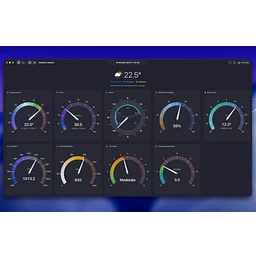
Home Assistant suits buyers who want a customizable dashboard using their station as the primary source.

Which brands AI mentions


Mentioned in · Jul 6 – Oct 25, 2026
ChatGPT SearchChatGPT SearchGoogle AI ModeGoogle AI Mode


Widest split: Ambient Weather Network, 8% on ChatGPT Search and 80% on Google AI Mode.
- =1Ambient WeatherChatGPT Search 68%Google AI Mode 68%
- =1Davis InstrumentsChatGPT Search 68%Google AI Mode 52%
- =1Weather UndergroundChatGPT Search 24%Google AI Mode 92%
- =4Ambient Weather NetworkChatGPT Search 8%Google AI Mode 80%
- =4EcowittChatGPT Search 32%Google AI Mode 40%
Questions and answers
Google AI ModeOct 25, 2026
To view your personal weather station (PWS) data directly inside a full-featured weather app, your best options depend on whether your station uploads data to a public network (like
Weather Underground or Ambient Weather) or if you want a direct local connection.- CARROT Weather (iOS, Android) — A critically acclaimed, highly customizable weather app that allows you to link your personal weather station (such as a Tempest or Weather Underground station ID) as your primary data source.
- Ambient Weather Network (iOS, Android) — If you own an Ambient Weather station, their dedicated app gives you clean real-time dashboards, graphs, and smart home integrations without relying on third-party middleware.
- Weather Underground (iOS, Android) — The classic community choice. If your station uploads to the WU network via PWS, you can search for and lock your station ID as your default location to see your precise backyard metrics.
- WeatherTracking: PWS (iOS) — A dedicated app built specifically around personal weather stations. It pulls data directly from networks like Tempest, Ambient Weather, Weather Underground, Davis, or Home Assistant without ads or tracking.
To help narrow down the ideal match, tell me:
- What brand or model is your weather station?
- Does it already upload to an online network (like Weather Underground or Ambient Weather), or do you need a local/direct connection?
Sources cited in this answer1
ChatGPT SearchOct 25, 2026
If you want a weather app that pulls live readings from your own personal weather station (PWS) rather than relying only on a nearby airport or a general forecast, there are several good options. The best choice depends on your station's brand, your phone, and whether you want a simple dashboard or detailed weather history.
Best weather apps for your own station
1. Weather Fusion — best for multiple station brands
(Best overall for Apple)
Supports Davis, Ecowitt, Ambient Weather, Netatmo, Tempest, and several other station systems. Includes live readings, historical charts, customizable dashboards, and widgets. Available for iPhone, iPad, and Mac.
Download or details:
2. Ambient Weather — best for Ambient stations
Shows your station's real-time conditions and historical charts, including temperature, humidity, rainfall, UV, and other supported measurements. Requires a station reporting to AmbientWeather.net.
Website:
3. SmartMixin Weather Station — best for detailed analysis
Connects supported stations from several brands, including Ecowitt, Davis, Ambient Weather, AcuRite, and Tempest. Offers historical analysis, forecast-model comparisons, radar, alerts, and widgets. Available on iOS and Android.
4. Weather Station: PWS & Radar — best for an Android weather display
Designed around your own station's live data, with weather charts, NOAA forecasts, and NEXRAD radar. Supports stations reporting through Weather Underground and certain compatible custom servers.
Let me narrow it down to the right app for you
What brand of personal weather station do you own, and what phone do you use?
1. Weather station brand
Ambient Weather
Ecowitt / Fine Offset
Davis Instruments
Tempest / WeatherFlow
AcuRite
Netatmo
Other / DIY / Raspberry Pi
Not sure
2. Your device
iPhone
Android
iPad / tablet
Computer / web browser
3. What do you want most?
Live temperature, wind, rain, and humidity
My station readings plus weather forecasts and radar
Historical charts, records, and downloadable data
A custom app or personal dashboard using my station's data
[Find my best match]
If you're looking to build your own app rather than install an existing one, I can help with that too, including connecting directly to your station's data feed.
Sources cited in this answer12
- weatherfusion.appWeather Fusion - Personal Weather Station App for iPhone, iPad, and Mac
- apps.apple.comWeather Fusion – PWS App - App Store
- weatherfusion.appWeather Fusion - Personal Weather Station App for iPhone, iPad, and Mac
- ambientweather.comAmbient Weather Support
- ambientweather.comSupport for the Ambient Weather Network (AmbientWeather.net)
- ambientweather.comHighest Rated Personal Weather Stations - Ambient Weather
ChatGPT SearchOct 16, 2026
Yes! There are several weather apps and online platforms that let you connect your private weather station and display its live readings, historical data, charts, and sometimes forecasts. The best choice depends on your station's brand and whether you want to view your data on your phone, share it publicly, or display it on a personal weather dashboard.
Best weather apps and platforms for personal weather stations
1. Weather Underground
(Best general-purpose option)
Upload your station's readings to a public weather dashboard and view live conditions, historical graphs, and nearby stations.
- Works with many compatible station brands.
- Provides station-specific pages and historical archives.
- Good for sharing your data with other weather enthusiasts.
Cost: Free station hosting.
2. Ambient Weather Network
Best if you own a compatible Ambient Weather station. View your own sensor data remotely, customize data tiles, set alerts, and share readings.
- Mobile app and online dashboard.
- Designed around compatible Ambient Weather hardware.
- Supports integrations with other services.
Cost: Free platform.
Website ·
3. Ecowitt
A good choice for Ecowitt stations and compatible sensor systems. Its app displays current readings and graphs, and compatible consoles can send data to other services.
- Live temperature, humidity, wind, rain, and additional sensor readings.
- Can upload to Weather Underground and Weathercloud.
- Supports custom upload servers on compatible hardware.
Cost: The core service is available free.
4. Weather Fusion – PWS
(Best multi-brand app for Apple devices)
A dedicated app for viewing your own station's readings from a single interface, rather than relying on separate manufacturer apps.
- Supports compatible Davis, Netatmo, Ecowitt, Ambient Weather, Tempest, and other stations.
- Live dashboards and detailed historical charts.
- Can monitor multiple stations.
Cost: Free download with in-app purchases. Available for iPhone, iPad, and Mac.
View in the Apple App Store osswww.ecowitt.netoss.ecowitt.netapps.apple.comosswww.ecowitt.net
5. Weathercloud
A browser-based option for publishing and monitoring personal weather station data, with station dashboards and weather graphs.
- Useful for sharing station readings online.
- Supported by a range of compatible weather consoles.
- Can complement your manufacturer's app.
Cost: Check current account plans and features.
Weathercloud website osswww.ecowitt.netosswww.ecowitt.net
Which one should you choose?
What you want My recommendation A simple online page with live readings and history Weather Underground An app designed for your station's brand The manufacturer's app One app for several brands of stations Weather Fusion, if you're on Apple A customized dashboard on a computer, tablet, or wall display WeeWX or Home Assistant To contribute readings to meteorologists and public weather networks Weather Underground or the The important distinction is that not every weather app can connect directly to every station. Some read data from your manufacturer's cloud service, while others require your console to upload data to a compatible service first.
Let me narrow it down for your station
What brand and model is your private weather station? For example, Ambient Weather WS-2902, Ecowitt, Davis Vantage Pro2, Tempest, AcuRite, or another brand.
With that information, I can identify the apps that actually support your station and recommend the best options for viewing your own data.
Sources cited in this answer17
- wunderground.comPWS Network Overview | Weather Underground
- wunderground.comPersonal Weather Station Hardware and Software | Weather Underground
- wunderground.comPWS Network Overview | Weather Underground
- wunderground.comPersonal Weather Station Hardware and Software | Weather Underground
- ambientweather.netAmbient Weather
- ambientweather.comSupport for the Ambient Weather Network (AmbientWeather.net)
Google AI ModeOct 16, 2026
Yes, several major weather applications and networks allow you to connect, stream, and display data from a private Personal Weather Station (PWS). How you connect typically depends on your station's brand and whether you want an app dedicated to your hardware or a community-wide weather platform.Popular weather apps and platforms that support private weather stations include:
- Weather Underground (WU) : One of the largest networks for PWS owners. If your weather station (such as Davis, Ambient Weather, AcuRite, etc.) has Wi-Fi capability, you can register your station on the Weather Underground PWS Setup Page to get a Station ID. You can then use the main Weather Underground app or search your Station ID to view your hyper-local live data, historical graphs, and share your metrics publicly.
- Ambient Weather Network (AWN) : If you own an Ambient Weather station, their dedicated app and web dashboard (Ambient Weather Network ) stream real-time data directly from your hardware. It features customized personal dashboards, historical charts, smart-home integrations (Alexa, Google Home, IFTTT), and interactive map layers showing your station alongside others globally.
- WeatherFlow Tempest : If you run a Tempest weather station, the official Tempest Weather app (available on iOS and Android) is tailor-made for it. It uses your station's data as the primary source for your local conditions, forecasts, and rain/lightning tracking, while also feeding data into broader networks if you choose.
- Ecowitt : For Ecowitt hardware or compatible white-label sensors (like the WittBoy), the Ecowitt app provides a comprehensive dashboard. It displays all hyper-local metrics—including soil moisture, solar radiation, and PM2.5 air quality if you have extra sensors—and easily syncs data outward to WU, WOW, or custom servers.
- PWS Monitor : A popular third-party iOS app specifically designed to track Personal Weather Stations. Instead of managing the hardware configuration itself, it hooks directly into networks like Weather Underground using your favorite or personal Station IDs to display gorgeous live metrics, charts, and home screen widgets.
If you'd like to share the brand and model of your weather station (or whether it has Wi-Fi capability), I can give you the exact steps or integration route to get it online.
Sources cited in this answer6
- kestrelinstruments.comHow do I get started with WeatherUnderground.com?
- wunderground.comDownload | Weather Underground
- ambientweather.comReal Time Weather Data on Ambient Weather Network
- ambientweather.comCommunity - Ambient Weather
- wunderground.comPersonal Weather Station Buying Guide | Weather Underground
- apps.apple.comPWS Monitor App - App Store













Also asked as
- I'm looking for a weather app compatible with my personal weather station so I can view my own local readings.