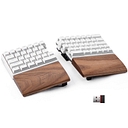
Compact mechanical keyboard
Data as of Oct 21, 2026A topic in Ergonomic Mechanical Keyboards and Mice. Reviewed by Dimitry Apollonsky
AI summary
Q1 Max has a clear lead for compact layouts that save desk space.
Which brands AI mentions





Mentioned in · Sep 24 – Oct 21, 2026
- KeychronChatGPT Search73%Google AI Mode40%
- EPOMAKERChatGPT Search64%Google AI Mode20%
- Royal KludgeChatGPT Search55%Google AI Mode20%
- LogitechChatGPT Search18%Google AI Mode30%
- NuPhyChatGPT Search36%Google AI Mode10%
- Zsa VoyagerChatGPT Search36%Google AI Mode0%


Questions and answers
- Can you recommend a mechanical keyboard with a smaller footprint that is designed for ergonomic use?
ChatGPT SearchOct 21, 2026
If you want a compact mechanical keyboard designed for ergonomic typing, I'd prioritize a split keyboard. It lets you position each half independently, which can help you keep your hands farther apart and your wrists straighter instead of reaching inward toward a conventional keyboard.
My top recommendation is the ZSA Voyager if minimizing desk space is your main goal. If you'd prefer to keep more of the familiar keys from a standard keyboard, there are some excellent alternatives.
My top 4 picks
(Best for small desks)
1. ZSA Voyager
$365
52 keys · Low-profile · Fully split
A remarkably compact design with mechanical switches, programmable keys, and magnetic tenting legs. Its small footprint leaves room for a mouse and other desk accessories.
Trade-off: You'll need to learn layers for functions that would normally have dedicated keys.
2. EPOMAKER Split65
Around $120
65% layout · Split · Adjustable positioning
A more affordable way to get a compact split mechanical board. It offers adjustable positioning, hot-swappable switches, and programmable layouts.
Trade-off: It still requires some layout adjustment, and it isn't as minimal as the Voyager.
3. Keychron Q11
Around $200
75% layout · Split · Programmable
Best if you want a more conventional typing experience. It retains more familiar keys while letting you separate the two sides for a more natural hand position. It also supports hot-swappable switches and QMK/VIA customization.
Trade-off: It's heavier and takes up more room than the smallest split boards.
4. Perixx PERIBOARD-335
Around $50
Compact · Low-profile · Curved split-key design
A budget-friendly option with a split keyframe and low-profile mechanical switches. Worth considering if you want an ergonomic shape without committing to a separate two-piece keyboard.
Trade-off: It doesn't offer the same independent positioning flexibility as a fully split keyboard.
Which one should you choose?
If your priority is… My pick Smallest practical footprint ZSA Voyager Best value for a split design EPOMAKER Split65 Keeping a familiar keyboard layout Keychron Q11 Lowest cost and simple transition Perixx PERIBOARD-335 One ergonomic tip: Look for a keyboard that lets you keep your wrists straight, your elbows relaxed, and your shoulders comfortable. Split positioning and optional tenting can help, but no keyboard guarantees pain prevention or comfort for everyone.
One question that would help me narrow this down: Do you want a keyboard that still looks and types like a normal keyboard, or are you open to an unusual split layout if it's more compact and ergonomic?
Sources cited in this answer10
- zsa.ioThe Voyager: A powerful, low-profile, split ergonomic keyboard | zsa.io
- zsa.ioThe Voyager: A powerful, low-profile, split ergonomic keyboard
- zsa.ioThe Voyager: A powerful, low-profile, split ergonomic keyboard | zsa.io
- epomaker.comEPOMAKER Split 65
- epomaker.comEpomaker Split 65 — Mechanical Keyboard, Built for Sound – EPOMAKER
- microcenter.comKeychron Q11 QMK Custom Mechanical Keyboard - Carbon Black A
Google AI ModeOct 21, 2026
For a small-footprint mechanical keyboard built with ergonomics in mind, the Logitech MX Mechanical Mini ($129.99) offers a compact low-profile layout, while options like the Keychron Q8 Max Alice or Perixx PERIBOARD-335 ($39.99) provide specialized split or curved layouts.[1][2]
Compact & Low-Profile Options
Logitech MX Mechanical Mini : Features a minimalist 75% layout with low-profile mechanical switches that reduce wrist extension without a steep learning curve.
Perixx PERIBOARD-335 : Offers a compact split-keyframe layout with an integrated adjustable-tilt wrist rest to promote natural arm positioning.[1][2]
Ergonomic Split & Alice Layouts
Keychron Q8 Max : Uses an Alice-style curved, angled layout in an all-metal body that saves desk space while keeping hands at a natural typing angle.
RK Royal Kludge A72 : A 68% compact board featuring an ergonomic Alice layout, hot-swappable switches, and wireless tri-mode connectivity.
If you prefer, tell me:
- Do you want a fully split two-piece keyboard or a single-piece curved (Alice) layout?
- Do you prefer wireless or wired connectivity?
I can help you narrow down the exact model for your setup.
- I need a mechanical keyboard that is ergonomic and takes up less desk space.
Google AI ModeOct 4, 2026
To get both ergonomics (reducing wrist/shoulder strain) and a small footprint (saving desk space), you generally look at
compact split mechanical keyboards, Alice/Aris-style angled layouts, or ultra-slim 75% boards with positive wrist placement.Top compact, ergonomic mechanical keyboard designs fit into distinct categories depending on how much space you want to save:
A split 60% mechanical gaming/productivity keyboard that gives you total freedom to angle the two halves to match your shoulder width. It includes a dedicated thumb cluster and a compact footprint that leaves plenty of room for your mouse.
If you aren't ready for a fully split keyboard, a compact 75% layout saves massive amounts of desk space by shrinking the arrow and function keys together without losing functionality. Combined with comfortable low-profile or well-damped switches, it provides a much more natural shoulder-width posture than a full-sized board.
A stellar gasket-mounted 75% wireless mechanical keyboard with a solid metal chassis. It has a tight, space-saving footprint and is fully programmable via QMK/VIA so you can map ergonomic shortcuts to minimize hand movement.
To help narrow down the ideal choice, let me know:
- Are you open to a fully split keyboard (two separate halves), or do you prefer a single compact board (like a 75% or Alice-style layout)?
- Is this primarily for office work/typing or gaming?
- Do you have a budget in mind?
Sources cited in this answer1
ChatGPT SearchOct 4, 2026
If your priorities are ergonomics + saving desk space, I’d focus on Alice-style or compact split mechanical keyboards rather than a conventional 75%/TKL board. Alice layouts angle the two key clusters inward while keeping a familiar layout, so they’re an easier ergonomic transition than a fully split board.
My top picks
RK Royal Kludge A72 Alice
$89.99
EPOMAKER Split 65
$119.99
NocFree Lite Split
$209.00
Iris LM Low-Profile Split
$179.99
KBDcraft Israfel 50% Split
$69.99
1. RK Royal Kludge A72 — best value
At about $90, this is probably where I'd start. It's a compact 68/72-key Alice layout, so you get ergonomic angling without the learning curve of a true split.2. EPOMAKER Split65 — best compact true split
Around $120, and importantly, the two halves can be adjusted to your preferred angle. That's a much bigger ergonomic improvement than simply going from a 100% keyboard to a smaller conventional layout.3. NocFree Lite — premium compact split
A good option if you're willing to spend around $200. It's wireless, hot-swappable and programmable, while keeping the separate-half design.4. Iris LM — maximum ergonomics for minimum footprint
This is the enthusiast option. It's a low-profile split with only the keys you really need, and its compact halves can leave a surprising amount of room for your mouse. It's programmable with QMK/VIA.5. KBDcraft Israfel — tiny footprint
If desk space is the #1 priority, this 50% split/ortholinear design is worth considering. It's dramatically smaller than a conventional keyboard, though it requires the biggest adjustment to your typing habits.What I'd choose
If you want… I'd buy… Best balance of comfort, size & price RK A72 Actual split ergonomics EPOMAKER Split65 Premium wireless split NocFree Lite Smallest serious ergonomic setup Iris LM Absolute minimum footprint KBDcraft Israfel One other approach is low-profile rather than aggressively reducing the key count. Low-profile mechanical boards reduce wrist extension and can be particularly comfortable on a small desk; RTINGS currently rates the NuPhy Air75 V3 as its top low-profile keyboard.
My personal recommendation for you: start with the RK A72 if you want something that feels like a normal keyboard, or the EPOMAKER Split65 if you're willing to adapt to a genuinely split layout. Both give you substantially more ergonomic benefit per square inch than simply buying a smaller 65% keyboard.
If you tell me your budget (e.g. <$100, $150, $250) and whether you need arrow keys / function row / wireless, I can narrow this to the best 2–3 choices currently available.
I need a mechanical keyboard that is both ergonomic and compact for my desk. What are some good options?
What is the best mechanical keyboard?
Summary
Air60 V2 Portable Wireless Low Profile Mechanical Keyboard is the usual answer. Its low-profile keys and Bluetooth support suit portable hybrid work setups.