For enterprise teams needing centralized, advanced resource rules across time zones and holidays, choose Celoxis. If you need integrated project/resource flow with many country holiday calendars pick Hub Planner. Use Smartsheet for spreadsheet-style scheduling, Float for visual capacity and time-off tracking, and World Time Buddy to spot meeting overlaps quickly.
If you mean a global resource-scheduling tool in general, the usual approach is:
Time zones: Resources are tied to a specific location/time zone, and schedules are converted automatically when viewed by users elsewhere. Good systems use named IANA time zones rather than fixed offsets, so daylight-saving-time changes don't shift appointments unexpectedly.
Working hours: Each resource can have its own working hours and, in some systems, different weekend days. This lets the scheduler distinguish genuine availability from merely being awake in another time zone.
Holiday calendars: Global resource tools can maintain separate holiday calendars by country/region, assign those calendars to individual resources, and display holidays directly in the resource schedule. Some support multiple calendars per person for people working across regions.
Scheduling logic: A slot is considered unavailable when it conflicts with a resource's working hours, local holiday, leave, or other booking. More sophisticated tools can evaluate all participants' local calendars simultaneously.
Google AI Mode· Sep 29, 2026
When managing global resources across sprawling international teams, robust scheduling tools handle time zones and disparate regional calendars through a combination of automated intelligence and localized configuration.
Here is how global resource management tools typically handle these multi-region complexities:
Time Zone Intelligence & Auto-Conversion : Systems automatically convert hours from a central project timeline into each individual resource's local time zone. This ensures that when a manager assigns a task or schedules a milestone, the notification and due hours accurately reflect the local working day without manual math.
Modern global resource management and scheduling systems handle distributed workforces, varied regional nuances, and localized time constraints through specialized architecture.
Time Zone Intelligence handles automatic conversion between local regions and centralized coordination clocks (like UTC) so availability is always viewed accurately without breaking math across borders.
When managing global resources across disparate geographies, a robust resource management framework handles time zones and holiday calendars through several integrated mechanisms.
Multi-Region Holiday Libraries: The system integrates pre-populated, regularly updated global public holiday databases. Localized calendars (e.g., UK bank holidays versus US federal holidays) can be assigned directly to specific regions, offices, or individual resources.
Time Zone Intelligence: Resource availability, capacity calculations, and allocations automatically translate to a unified master timeline or convert dynamically to the viewer's local time zone. This prevents double-booking or assigning unrealistic deadlines outside of local working hours.
If you mean a global resource-scheduling tool, the usual approach is to treat time zones and holidays as separate scheduling constraints:
Time zones: Each resource/user has a local time zone, while scheduled events are represented with an unambiguous time-zone identifier or UTC. This matters for daylight-saving changes and recurring events; standards such as iCalendar explicitly support TZID/VTIMEZONE for this purpose.
When managing global resources, handling cross-border teams effectively requires automated intelligence rather than manual math. Modern resource management tools tackle multi-region complexities through several core mechanisms:
Time Zone Intelligence: Tools anchor resource availability and allocations to individual local times or a standardized company baseline, auto-adjusting for regional Daylight Saving Time (DST) changes so capacity calculations don't break mid-year.
Calendar output: Once a time is selected, calendar integrations generally preserve the event's time-zone information so each participant sees the correct local time.
Example: A project team has resources in Detroit, London, and Tokyo. A scheduler should evaluate each person's local working hours and holiday calendar—not simply convert Detroit's 9 AM into the other two time zones. If Tokyo has a holiday, that resource should be unavailable even though it's an ordinary working day in Detroit.
If you meant a specific tool or product by “this tool,” tell me its name and I can look up its exact time-zone and holiday-calendar behavior.
Regional & Country Holiday Libraries : Many platforms feature pre-populated, regularly updated public holiday databases spanning multiple countries. Instead of manually tracking regional bank holidays, you assign a specific country or regional calendar (e.g., UK Bank Holidays vs. Spanish national holidays) to a specific resource or office location.
Customizable Working Hours & Availability : Resource capacity isn't calculated using a flat 24-hour or standard 8-hour global block. The tool adjusts availability metrics (FTE or hours per week) based on local working hour agreements, half-days, or regional weekend definitions (such as Sunday–Thursday workweeks in specific regions).
Automated Conflict Alerts & Warnings : If a project manager attempts to schedule a deliverable, meeting, or shift during a recognized regional holiday or outside a resource's active working hours, the system flags a scheduling conflict alert to prevent burnout or missed deadlines.
Consolidated Global Dashboard : Managers retain a high-level, unified view of the entire international team's capacity. Visual indicators and color-coded filters make it easy to see who is online, on leave, or observing a local holiday at a glance.
If you have a specific tool in mind or want to share which countries/regions your team operates in, I can give you a more precise breakdown of how to configure it.
Multi-Country Holiday Libraries utilize pre-populated and regularly updated databases of regional public and statutory holidays for every operating country.
Customizable Local Settings allow organizations to layer regional or custom company-specific holidays over top of standard national calendars.
Conflict Alerts warn managers dynamically if an assignment or milestone accidentally lands on a resource's regional holiday or outside of their local working hours.
Automated Capacity Adjustment recalculates utilization metrics and project timelines dynamically, ensuring that a holiday in Tokyo or London doesn't falsely register as under-allocation or missed output on a global dashboard.
For visual mapping and overlapping hours, teams also often pair resource software with visual tools like World Time Buddy.
Could you tell me which specific tool or platform you are using (or evaluating), and how many distinct countries/time zones your team spans? I can give you a much more tailored breakdown.
If you mean a global resource-management/scheduling tool, the usual approach is:
Time zones are attached to each resource/location. A booking is stored as a specific instant, then displayed in each participant’s local time. Good systems also account automatically for daylight-saving changes.
Working hours are location-specific. You can define, for example, 09:00–17:00 in New York independently of 09:00–17:00 in Tokyo, and the scheduler looks for overlapping availability.
Holiday calendars are assigned by geography/resource. Global scheduling products commonly let administrators maintain separate country/region calendars and assign them to individual resources, so a holiday in one country doesn't automatically make everyone unavailable.
Regional and custom holidays can be handled separately. This matters for countries where holidays vary by state/province, region, religious observance, or company policy.
Conflict detection can incorporate both. A scheduling system can warn that a proposed assignment falls outside someone's working hours or on their local holiday, while still allowing an explicit override when necessary.
For global resource allocation, the important design principle is therefore: schedule against each resource's local calendar, but store the underlying event unambiguously in time. That prevents a holiday or midnight boundary in one region from accidentally shifting availability in another.
If you're referring to a specific tool you're using, tell me its name and I can explain its exact time-zone and holiday-calendar behavior.
If you mean a global resource-scheduling tool in general, it typically handles this by separating time zones, working calendars, and resource availability rather than treating everyone as if they share one clock.
Time zones: Each resource is associated with a local time zone. Scheduled work is converted between the resource's local time and the planner's view, so a 9:00 AM shift in London doesn't accidentally become 9:00 AM in New York. Robust systems use named time zones so daylight-saving changes are handled automatically.
Working hours: Resources can have their own working patterns—e.g., Monday–Friday 9–5 in their local zone. Scheduling engines then determine whether a resource is actually available at a requested time.
Holiday calendars: Holidays can be assigned by country, region, office, or individual resource. A scheduling system can then mark those periods as unavailable and flag or prevent conflicting assignments. Some systems support separate calendars for national, local, religious, and company-specific holidays.
Exceptions: Holidays aren't necessarily absolute. A resource calendar can allow an explicit override when someone is scheduled to work on an otherwise non-working day.
Global planning: For a multinational operation, the useful model is generally resource → location/time zone → working calendar → holiday calendar → availability. That lets the system find capacity without assuming that a working day in one region is a working day everywhere.
For example, if a project needs 8 hours of work from a team member in Tokyo and another in New York, the scheduler can account for each person's local working hours and holidays and arrange the work around their actual availability rather than simply adding eight hours to a universal clock.
One important caveat: holiday calendars need to be maintained carefully. Public holidays can differ by region and can change, while some observances depend on local rules. A global scheduling system should therefore allow calendars to be customized rather than relying exclusively on a single worldwide holiday list.
If by “this tool” you mean a particular product or scheduling system, tell me its name and I can explain its exact time-zone, DST, holiday-calendar, and recurring-schedule behavior.
Automated Conflict Alerts: The scheduling engine flags or blocks allocations that land on recognized regional holidays or outside a resource's defined working hours, preventing workflow disruptions before they happen.
Customized Working Profiles: Beyond standard holidays, organizations can configure custom regional workweeks (such as Sunday–Thursday schedules in specific Middle Eastern regions) and company-specific or department-specific blackout dates.
Capacity and Utilization Accuracy: Non-working days and regional holidays are automatically deducted from a resource's available capacity (Hours = WorkingDays × DailyCapacity), ensuring project utilization reports and forecasting remain accurate globally without manual adjustments.
If you can share the specific platform or software you are using to manage your resources, I can give you the exact steps or features it uses for time zones and holiday sync.
Local working hours: The scheduler can translate a requested time across locations—for example, a 9:00 AM New York booking becomes the appropriate local time for a team in London or Tokyo—while respecting each location's working window.
Holiday calendars: A resource can have one or more holiday/non-working calendars associated with its location or organization. The scheduler treats those dates as unavailable (or reduced-capacity), rather than simply assuming weekends are the only non-working days.
Multiple calendars: For a global operation, you can apply different calendars to different resources—for example, U.S. federal holidays for one team and Japanese public holidays for another.
Conflicts: Scheduling should evaluate the local availability of every participating resource, then find an intersection that works for everyone. If no intersection exists, it can surface alternatives rather than silently shifting the meeting.
Recurring schedules: Time-zone-aware recurrence is particularly important because daylight-saving transitions can otherwise cause recurring events to move by an hour.
One important distinction: I can describe this architecture, but I can't tell from your question which specific scheduling tool you're referring to. If you give me the tool/product name, I can check its actual handling of time zones, regional holiday calendars, overrides, and daylight-saving changes.
Most robust global resource management and scheduling platforms handle cross-regional logistics through integrated localization engines.
Here is how these tools typically manage time zones and holiday calendars:
Time Zone Intelligence: Systems automatically convert project timelines and allocation hours into the local time zone of the assigned resource or project manager, ensuring availability is calculated using actual local working hours rather than a rigid central clock.
Regional Holiday Libraries: Enterprise tools feature pre-populated, regularly updated public holiday databases spanning multiple countries, which automatically block out non-working days so they aren't factored into project capacity or deadlines.
Custom & Subsidiary Calendars: Organizations can assign specific location-based or department-based calendars to account for regional nuances (e.g., regional holidays, state vs. national holidays, or customized company shutdown days).
Conflict & Capacity Alerts: If a manager tries to schedule a deliverable or a meeting during a recognized local holiday or outside a resource's standard working hours, the system triggers an automated warning or adjusts capacity calculations to 0 for that day.
Backend UTC Standardization: To prevent data corruption or logging errors, systems often store underlying timestamps in Coordinated Universal Time (UTC), converting to local views only on the frontend interface.
If you have a specific software platform in mind (such as Hub Planner, Mavenlink/Kantata, or Resource Guru), let me know and I can detail how that exact tool handles configurations.
Regional Holiday Libraries: Pre-populated or customizable holiday databases let you assign specific country or state/provincial holiday calendars directly to individual profiles or whole regional groups.
Automated Capacity Adjustments: When a regional public holiday or localized time-off occurs, the system automatically subtracts those non-working hours from the resource's total available capacity, preventing over-allocation.
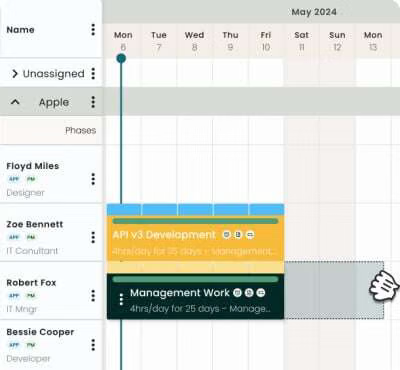
Visual Conflict Highlighting: Planners and managers get a unified multi-country calendar view that flags overlapping availability or warns when a deadline clashes with a local holiday or weekend.
Could you let me know which specific resource management software or platform you are currently evaluating or using so I can give you the exact setup steps?
If you mean a global resource-management/scheduling tool, the usual approach is:
Time zones are attached to each resource/location. A resource’s working hours are interpreted in its local IANA time zone, then converted when you view or coordinate the schedule elsewhere. This avoids manually shifting times when locations differ.
Daylight-saving changes are handled automatically when the system uses proper time-zone rules, so a recurring schedule doesn't simply remain at a fixed UTC offset after clocks change.
Holiday calendars can be location-specific. Global resource systems commonly maintain separate calendars by country/region and assign one or more calendars to each resource. Holidays can then show as non-working periods in the resource scheduler.
Regional holidays matter independently of your own calendar. For example, a U.S.-based planner should not assume a resource in another country is available simply because it is a normal U.S. workday. More sophisticated schedulers evaluate the holiday against the resource's local date.
Custom/company holidays can be layered on top. Systems may let you add, remove, or modify imported public holidays to reflect company-wide shutdowns or local policies.
So, conceptually, a global schedule is resource → location/time zone → working calendar → holidays/leave → availability. The scheduler can then find capacity without treating everyone as if they share the same clock or holiday calendar.
If by “this tool” you mean a specific product you're evaluating, tell me its name and I can explain its exact time-zone and holiday-calendar behavior.