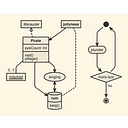
PlantUML is the most recommended solution for users needing a mature, robust, and industry-standard way to create diagrams using text. It excels at complex UML and technical documentation without requiring drag-and-drop. For those needing a unified interface for multiple languages, Kroki is recommended, while Graphviz remains the specialized choice for technical graph layouts.
PlantUMLPlantUML is the most mature alternative to Mermaid, best for software architecture and complex UML. It is highly feature-rich and durable for professional docs, though it offers a steeper learning curve than simple AI generators.
Mature and powerful; supports many UML diagram types.
Graphviz
Graphs, dependencies, networks
A -> B
Older but extremely capable layout engine; good for large graphs.
Structurizr DSL
Software architecture (C4 model)
declarative architecture definitions
Good if you think in systems, containers, and components.
nomnoml
Simple UML sketches
[User]->[API]
Lightweight and easy for quick diagrams.
Quick recommendations
Closest “upgrade” from Mermaid:D2 — similar idea, but many people prefer its syntax and layout behavior for architecture diagrams.
Need UML class/sequence/component diagrams:PlantUML.
Need huge dependency graphs or automated graph layouts:Graphviz DOT.
Need diagrams inside Markdown/GitHub without extra tooling: Mermaid is still hard to beat because of native integrations.
A tiny example in D2:
User -> Frontend: visits
Frontend -> API: request
API -> Database: query
Database -> API: results
API -> Frontend: response
A similar Mermaid diagram would be:
Mermaid flowchart: User, Frontend, API, DatabaseUserFrontendAPIDatabaseFor most developer documentation today, I would shortlist D2 + Mermaid + PlantUML and pick based on whether you care most about layout quality, Markdown embedding, or UML completeness.
If you want a text-based diagramming tool like Mermaid (diagram-as-code, no drag-and-drop canvas), these are the main options:
Tool
Best for
Notes
D2
Modern flowcharts, architecture diagrams
Clean declarative syntax and strong automatic layout; a good choice if Mermaid layouts become messy.
PlantUML
UML, software architecture
Very mature; supports many UML diagram types and detailed customization.
Graphviz
Graphs, dependency maps, networks
Uses the DOT language; excellent for large graph structures.
Structurizr DSL
Software architecture documentation
Designed around the C4 model and architecture-as-code workflows.
Kroki
Rendering many text diagram formats
Lets you use multiple diagram languages through one rendering interface.
Quick picks:
Closest “Mermaid but nicer layout” → D2
Closest “Mermaid for serious software design/UML” → PlantUML
Best for huge dependency/network diagrams → Graphviz
Best if diagrams live in Git repositories and documentation → Mermaid itself or D2
Best if you need architecture models (C4) → Structurizr DSL
Example D2 syntax:
user: User
api: API Server
db: Database

user -> api: request
api -> db: query
db -> api: result
It renders into a diagram without manually placing boxes.
If you want something that works directly inside Markdown files (GitHub/GitLab-style), Mermaid still has a major advantage because of its ecosystem integration.
If you love the "diagram-as-code" concept of Mermaid and want to avoid graphical canvases entirely, several powerful text-based alternatives exist depending on what you are trying to map out:
PlantUML - A long-standing industry standard for software architecture, sequence diagrams, class diagrams, and component maps. It uses a highly readable, expressive plain-text syntax and renders richly detailed diagrams.
D2 - A modern, highly opinionated diagramming language that turns text into beautifully organized diagrams. It features an incredible built-in layout engine (ELK) that automatically handles spacing and complex geometries so your charts never look messy.
Graphviz - The classic DOT language tool. Excellent for writing programmatic descriptions of complex network topologies, relational graphs, and data structures where nodes and edges are computed or declared cleanly as text.
Diagrams (Python) - A Python library specifically built for prototyping cloud system architectures (AWS, Azure, GCP, Kubernetes) using pure Python code blocks rather than manual layout tools.
Markmap - A specialized tool that takes a standard Markdown hierarchical list (bullet points) and instantly compiles it into an interactive mind map.
If you can tell me what kind of diagram you are making (e.g., cloud architecture, software sequence, database ERD, or simple flowchart) and where you plan to embed or run it , I can recommend the exact syntax and tool that fits best.
Yes. If you want “write text → get a diagram” with no drag-and-drop, I’d shortlist these:
d2lang.com — my top recommendation. Modern, concise syntax and particularly good automatic layout for architecture and relationship-heavy diagrams. It can run as a standalone CLI, so your diagrams can live alongside code and documentation.
plantuml.com — best for UML. Excellent if you need class, sequence, activity, state, component, deployment, and other formal UML diagrams.
graphviz.org — best for graphs/dependencies. Its DOT language is very mature and works especially well for large node-and-edge graphs.
visual-paradigm.com — best if you want a browser editor. You type Mermaid, PlantUML, D2, or Graphviz and see the rendered diagram alongside it, without manually positioning shapes.
A quick D2 example
User -> Web App: HTTPS
Web App -> API: REST
API -> Database: SQL
API -> Cache: Redis
That produces the diagram automatically from the text.
My pick: start with D2 if you're making software architecture, flowcharts, system diagrams, or technical documentation. Stick with Mermaid if your main requirement is embedding diagrams directly in Markdown/GitHub; D2 is more attractive when Mermaid's layouts start getting messy.
If you tell me what you're diagramming (e.g. software architecture, flowcharts, ERDs, UML, network diagrams, or mind maps), I can recommend the best one and give you a ready-to-use example.
If you love the "diagrams-as-code" concept of Mermaid, there are several powerful text-based alternatives depending on the style and output you need.
Here are the best text-based, no-drag-and-drop diagramming tools:
PlantUML – The gold standard for comprehensive software and system architecture diagrams. It uses a highly readable, intuitive plain-text syntax to generate sequence diagrams, use cases, class diagrams, activity diagrams, and more. You can try it directly via PlantText.
D2 Language – A modern, highly polished declarative diagram scripting language that turns text into professional, stylized diagrams. It excels at auto-layout, supports organic/hand-drawn aesthetics, and handles complex system architectures with very clean syntax.
Diagrams (Python Library) – If you write Python, this lets you draw cloud system architectures (AWS, Azure, GCP, Kubernetes, etc.) programmatically. You write code to define nodes and connections, and it outputs gorgeous infrastructure graphics without you ever touching a shape on a canvas.
Nomnoml – A lightweight, highly minimalist web-based tool that renders UML-style class and structure diagrams straight from a simple, enclosing-bracket text syntax in real time.
Ditaa / ASCII-art tools (like Monodraw for macOS) – If you want your text-based diagrams to literally remain as clean ASCII/Unicode text blocks (great for embedding directly into code comments or markdown source files), tools like Ditaa or Monodraw let you script or type box-and-line art seamlessly.
If you want to narrow this down, let me know:
What specific type of diagram are you trying to make (e.g., cloud architecture, sequence diagram, flowchart)?
Do you prefer rendered graphics (SVG/PNG) or diagrams that stay as pure text/ASCII art?
Yes. If you want “write text → get a diagram” rather than a canvas/drag-and-drop editor, these are the strongest options:
d2lang.com — My top recommendation if you want something Mermaid-like but more modern. Its syntax is concise, and it has strong automatic layout and styling. It works well for architecture diagrams and complex graphs.
plantuml.com — Best if you need UML, especially sequence, class, state, activity, component, and deployment diagrams. It is more feature-rich than Mermaid but somewhat more verbose.
graphviz.org — Excellent for dependency graphs, network diagrams, trees, and other node/edge-heavy visualizations. Its DOT language is extremely mature, though less pleasant for specialized diagram types.
visual-paradigm.com — A browser-based editor where you can write Mermaid, PlantUML, D2, or Graphviz in one place and see the result live. Useful if you want to experiment without installing anything.
My quick recommendation
If your requirement is essentially “Mermaid, but I want alternatives”, I'd try:
D2 → PlantUML → Graphviz
D2 is probably the closest fit if you're making software/architecture diagrams and want readable source code with good automatic layout.
For example, D2 can be as simple as:
User -> Web App: HTTPS
Web App -> API: REST
API -> Database: SQL
No boxes to drag around—the relationships and layout are generated from the text.
If you love the "diagram-as-code" concept and want to stay completely away from manual dragging, dropping, and pixel-tweaking, several powerful text-based alternatives exist. They range from modern declarative languages to pure ASCII/Unicode art generators:
PlantUML — The veteran alternative to Mermaid. It uses a robust, intuitive plain-text syntax to generate sequence diagrams, use cases, class architectures, activity charts, and even Gantt charts. It requires a backend/server to render, but extensions exist for almost every major IDE and markdown viewer.
D2 — A modern, highly polished declarative language for turning text into diagrams. D2 (Declarative Diagramming) automatically lays out your shapes, handles complex grid or flexbox-like arrangements, and yields exceptionally clean, modern SVG outputs without you needing to specify exact coordinates.
Graphviz — The ultimate classic for graph-based visualization. Using the DOT language, you define nodes and directed/undirected edges, and Graphviz computes complex, optimized graph layouts automatically. It is unmatched for data structures, networks, and dependency trees.
Nomnoml — A lightweight, minimalist web-based tool that compiles a simple, highly readable syntax on the fly into crisp UML-style boxes and association lines. It has almost zero learning curve if you just want quick box-and-line logic.
Ditaa — "Diagrams Through ASCII Art." If you want your text-based input to literally turn into hand-drawn style box diagrams or retro computer diagrams from plain text blocks, Ditaa parses ASCII drawings embedded in text files and converts them into crisp graphic images.
Text-to-Diagram (AsciiArt) — While AsciiFlow has visual elements, if you prefer typing pure text characters, writing raw ASCII/Unicode connections via text editors remains a timeless way to keep architecture directly inside code comments or markdown files.
Would you like to focus on a specific type of diagram (like system architecture, sequence flows, or data graphs), or do you want a recommendation based on where you plan to write/render it (like inside Markdown, an IDE, or CLI)?
Yes. What you’re looking for is generally called a text-to-diagram or diagram-as-code tool: you write code/text, and the tool generates the diagram—no drag-and-drop required.
Best options
D2 — Probably my top recommendation if you like Mermaid. Its syntax is concise and modern, with particularly good automatic layout and styling.
PlantUML — Excellent if you're making UML, architecture, sequence, class, state, or component diagrams. It has much broader UML coverage than Mermaid.
Graphviz — Very mature and powerful for graphs, dependency diagrams, networks, and relationship maps. You write DOT syntax rather than drawing nodes manually.
VPasCode — A particularly convenient browser-based editor if you don't want to install anything. It supports Mermaid, PlantUML, D2, and Graphviz in one text editor with live preview.
What I'd choose
If your requirement is "Mermaid-like, but I want a dedicated tool", I'd start with D2.
For example, D2 can be as simple as:
User -> Web App: Request
Web App -> API: Authenticate
API -> Database: Query
Database -> API: Results
API -> Web App: Response
Web App -> User: Page
It automatically turns that text into a diagram, so the source can live alongside your code/docs and be version-controlled. D2 is specifically designed for both small and complex diagrams.
If you tell me what kind of diagrams you need (software architecture, flowcharts, ERDs, UML, network diagrams, org charts, etc.), I can narrow this down to the best 1–2 tools.
If you tell me what kind of diagrams you need (software architecture, flowcharts, sequence diagrams, ERDs, org charts, etc.), I can narrow this down to the best 1–2 tools for you.
If you like Mermaid's "diagram-as-code" approach but want to explore other options (whether for more complex layouts, different styling, or specific use cases), several powerful text-based alternatives exist:
PlantUML — A mature, highly capable text-based tool that uses a simple and intuitive language to design sequence diagrams, use cases, class diagrams, architecture layouts, and even Gantt charts. It requires a Java/Graphviz backend (or a public rendering server) and is heavily supported across IDEs and wikis.
Graphviz — The classic open-source graph visualization software. It uses the DOT language to describe structural information as abstract graphs and networks. It's unmatched at automatically calculating complex node-and-edge layouts for massive datasets or dependency trees.
Diagrams (Python Library) — If you write Python, this lets you draw cloud system architectures (AWS, Azure, GCP, Kubernetes, etc.) using Python code rather than dragging icons. It's fantastic for keeping infrastructure diagrams in Git version control.
D2 (Declarative Diagramming) — A modern domain-specific language that turns text into diagrams. It emphasizes a clean, modern aesthetic out-of-the-box, supports auto-layout, and handles complex connections and grouping very intuitively compared to older tools.
Nomnoml — A lightweight, real-time client-side tool that draws UML class diagrams based on a super simple, highly readable token-based syntax. Great if you want something fast and minimalist.
Markmap — A specialized tool that combines Markdown with mind mapping, instantly turning standard bullet-point lists into interactive, expanding visual mind maps.
If you have a specific type of diagram in mind (like architecture/cloud infrastructure, UML/sequence charts , or data/network graphs ), let me know and I can recommend the exact syntax and tool that fits best.
Yes — if you want “write text/code → get a diagram” rather than a canvas where you drag boxes around, these are the strongest options:
mermaid.js.org — probably the best starting point. Very simple syntax, excellent for flowcharts, sequence diagrams, ER diagrams, state diagrams, timelines, etc. It has a live editor and works particularly well in Markdown/documentation.
d2lang.com — my pick if you want something more modern and visually polished. It's explicitly a declarative language that turns text into diagrams, with strong styling, containers, Markdown, code snippets, and architecture-diagram support.
plantuml.com — excellent for software engineering and formal UML: class, sequence, activity, component, deployment, state diagrams, etc.
graphviz.org — particularly good for graphs, dependency trees, networks, and automatically laid-out relationship diagrams. It's more technical than Mermaid.
My recommendation
If your requirement is simply “I never want to drag nodes around”, I'd choose:
Mermaid → easiestD2 → nicest/most flexiblePlantUML → best for UML/software designGraphviz → best for complex graph relationships
For example, Mermaid lets you create a flowchart with just:
Mermaid flowchart: User, Web App, API, (Database)UserWeb AppAPI(Database)You change the text, and the layout is regenerated automatically—no manual positioning.
If you tell me what kind of diagrams you make (software architecture, flowcharts, org charts, network diagrams, ERDs, etc.), I can recommend the best one and give you a ready-to-use setup.