Amazon Echo and Apple are nearly tied for centralized management of connected devices. Alphabet is the usual answer when buyers ask about voice assistants.
I want to manage my smart lights, thermostat, locks, and appliances from one place. What is the best way to set up centralized control for all these devices?
Google AI Mode· Oct 13, 2026
Setting up centralized control for a mixed ecosystem of smart lights, thermostats, locks, and appliances requires an overarching smart home platform . Choosing the "best" way depends heavily on your technical comfort level and the specific brands you own or plan to buy.
The top pathways to achieve total centralization include:
The best way to manage your smart lights, thermostat, locks, and appliances from one place is to build a centralized smart home system: one app or hub that connects your devices, lets you control them together, and runs automations automatically.
My recommendation is to choose one primary platform, prioritize devices that support Matter, and add a dedicated hub if your devices need one. Matter is designed to help devices from different manufacturers work together, reducing the need to stay within a single brand's ecosystem.
1. Choose your central control platform
Google Home — best for most beginners
An accessible app for controlling lights, thermostats, compatible locks, plugs, and appliances, with voice control and routines. A compatible Google hub is needed for certain Matter setups.
Control compatible accessories through your iPhone, Siri, and home automations. A suitable Apple home hub enables additional remote-control and automation capabilities.
Best if you primarily use an iPhone, HomePod, or Apple TV.
A powerful home automation platform that can integrate many brands and protocols, support local control, and connect with Google Home, Apple Home, or Alexa. It takes more setup than the mainstream options.
Best if you want advanced automations, customization, and greater control over your setup.
Identify the brands and models of your lights, thermostat, locks, and appliances. Check whether they support Matter, your chosen platform, or a compatible hub.
Step 2: Set up the hub or controller
Use a compatible Google, Apple, or Amazon hub for a simpler setup, or a dedicated Home Assistant system for greater flexibility. Some older devices require their own bridge.
Step 3: Add and organize your devices
Connect each device using its app or integration. Group devices by room, such as Bedroom, Kitchen, and Living Room, so you can control several devices together.
Step 4: Create automations
Set schedules, triggers, and routines for everyday activities. Test locks and other security-related actions carefully.
For a technical reference, Home Assistant's Matter setup guide explains device pairing and how bridges can bring compatible non-Matter devices into your system.
3. What centralized control can do for you
Lighting
Turn off every light at bedtime, dim the living room for movies, or switch on outdoor lights at sunset.
Climate
Adjust the thermostat on a schedule or change the temperature when you leave home.
Locks and security
Check lock status, receive alerts, and automate locking where supported. Keep manual access available and use strong account security.
Appliances
Schedule compatible plugs, coffee makers, and appliances. Only remotely switch appliances that are designed for that type of control; avoid cutting power to devices that must remain powered.
4. My recommendation for your home
Want the easiest setup? Start with Google Home or Alexa, depending on the devices you already own.
Mostly use Apple devices? Start with Apple Home.
Want nearly everything under one customizable dashboard? Consider Home Assistant, especially if your devices come from many different brands.
Don't buy a new hub or replace devices until you've checked compatibility. Matter support also doesn't guarantee that every advanced feature of a lock, thermostat, or appliance will be available in every app.
Let's narrow it down to the best setup for you
Which phone do you primarily use?
iPhone
Android
Both / shared household
Are your smart devices mostly from one brand or mixed?
To control your smart lights, thermostat, locks, and appliances from one app, you need a smart home ecosystem (a central app and sometimes a hub) that connects devices from different brands. The general setup looks like this:
Choose a central platform
Popular options include:
Google Home — Works with many lights, thermostats, locks, cameras, and appliances. Compatible devices can be added to the Google Home app for unified control.
Apple Home — Best if you use iPhone/iPad/Apple Watch. A Apple HomePod or Apple TV can act as a home hub for automations and remote access.
Amazon Alexa — Broad device support and voice control through Echo devices.
Samsung SmartThings — A hub-based option that supports many device types and protocols.
Home Assistant — A more customizable option for advanced users.
Check device compatibility before buying
Look for labels such as:
Works with Google Home
Works with Apple Home / HomeKit
Works with Alexa
Matter compatible
Zigbee or Thread support
The newer Matter standard is designed to help smart home devices from different brands work together across platforms.
Add your devices to the main app
Example:
Smart bulbs → add to your home app
Thermostat → connect climate control
Smart locks → connect security/entry
Smart plugs → connect appliances
Once connected, you can create:
“Good morning” routine → open blinds, turn on lights, adjust thermostat
“Leaving home” routine → lock doors, turn off lights, lower temperature
“Good night” routine → lock doors and shut everything down
Decide whether you need a hub
You may not need one if your devices use Wi-Fi and work directly with your chosen app. Some systems work better with a dedicated hub for reliability, local control, and devices using Zigbee, Z-Wave, or Thread.
Simple recommendations:
iPhone household: Apple Home + Matter-compatible devices
Android household: Google Home + Matter-compatible devices
Mixed brands and maximum flexibility: SmartThings or Home Assistant
Easiest voice control: Alexa, Google Home, or Apple Home with a smart speaker
When buying new devices, choosing Matter-compatible products is usually the best way to avoid ending up with a separate app for every gadget.
Controlling your entire smart home through a single app or hub is entirely doable , largely thanks to Matter (the universal smart home standard) and robust multi-protocol ecosystems.
To bring your lights, thermostat, locks, and appliances under one roof, you have a few primary paths depending on your technical comfort and the gear you already own.
1. The Ecosystem Approach (Easiest & Free)
If you already use a major tech ecosystem, you might already have a free, built-in app on your phone that can act as your single dashboard. These ecosystems use your phone or a smart speaker/display as the hub and support thousands of third-party brands.
Apple Home: Ideal if everyone in the home uses iPhones. Clean interface, high privacy, and controlled via the Apple Home app. Requires an Apple TV or HomePod acting as a home hub for remote access.
Google Home: Great for Android and mixed households. The Google Home app unifies lights, thermostats, and appliances, and integrates seamlessly with Google Assistant.
There isn’t one universally “best” smart-home hub—the right choice depends heavily on your devices and how much you want to tinker. In 2026, Matter + Thread support is a good baseline for a new setup.
My shortlist
Best for most mixed-brand homes: Aqara Hub M3 — Matter controller, Thread Border Router, Zigbee, local automations, and integrations with Apple Home, Google Home, Alexa, and SmartThings.
Aqara Hub M3 - $159.99 (Aqara LLC)
Best for maximum control: Hubitat Elevation C-8 Pro — strong local processing, Zigbee/Z-Wave/Matter support, and sophisticated automations without depending on the cloud.
Hubitat Elevation C-8 Pro - $184.95 (HUBITAT)
Best for serious enthusiasts: Home Assistant — enormous integration flexibility and highly customizable local automation, but it has the steepest learning curve.
Best if you're already an Apple household: HomePod mini / Apple TV — excellent fit with Apple Home, Matter, and Thread, particularly if your household already uses iPhones.
Apple HomePod mini - $149.99 (Walmart)
Best mainstream mixed-protocol option: SmartThings/Aeotec — particularly attractive if you have Zigbee/Z-Wave devices alongside newer Matter devices.
If you tell me what you already own (iPhone vs Android, Alexa/Google/Siri, Hue, Ring, Nest, Aqara, Lutron, Ecobee, smart locks, etc.) and roughly how many devices you have, I can narrow this to the one I'd choose for your setup.
Selecting the best smart home hub depends heavily on your preferred voice assistant, whether you value ease of use over complex automations, and which wireless protocols (like Zigbee, Z-Wave, or Matter) your devices use.
Best Overall Multi-Protocol Hub
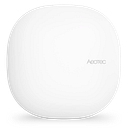
If you want a traditional hub that bridges almost anything, the Aeotec Smart Home Hub (powered by Samsung SmartThings) is your best bet. It features extensive compatibility out of the box. However, note that while the classic v3 hub includes a Z-Wave radio, the newer generation prioritizes Matter and Zigbee.
Best for Alexa & Visual Control
For those deeply embedded in the Amazon ecosystem, the Amazon Echo Hub serves as a dedicated, wall-mountable 8-inch touchscreen dashboard. It handles multi-device widget controls effortlessly and includes built-in radios for Zigbee, Thread, and Matter.[2]
Amazon Alexa: Excellent for broad device compatibility. The Alexa app and an Echo device act as the command center for voice and app control.
2. The Dedicated Smart Hub Approach (Most Reliable)
If you have devices using different wireless protocols (like Zigbee, Z-Wave, or local Wi-Fi) or want local processing that doesn't slow down your internet, a dedicated hardware hub is best.
Samsung SmartThings: The SmartThings Hub connects Wi-Fi, Zigbee, and Z-Wave devices into the SmartThings app, offering robust automations and wide brand support.
Homey Pro: A high-end standalone option like the Homey Pro Smart Home Hub supports Wi-Fi, Bluetooth, Zigbee, Z-Wave, Infrared, Matter, and Thread, uniting over 1,000 brands into a single app.[1][2]
3. The Power-User Approach (Ultimate Control)
Home Assistant: Running Home Assistant on a dedicated mini-PC or Raspberry Pi gives you the ultimate single dashboard. It integrates locally with almost every brand imaginable (even ones that don't natively like each other) without relying on cloud servers. It has a steeper learning curve, but it is completely private and infinitely customizable.
Tips for Making It Work Smoothly
Look for the "Matter" logo: When buying new gear, look for Matter-certified devices. They are designed to work across Apple, Google, Amazon, and SmartThings interchangeably out of the box.
Check appliance compatibility: Major smart appliances (like Samsung, LG, or Whirlpool) usually require their own brand cloud connection linked into your main app (like Google Home or Alexa), so verify that your appliance brand syncs with your chosen hub before buying.
To help narrow down the best single-app solution for you, tell me:
What brand of phones do you and your family use (iPhone vs. Android)?
Do you already own any smart speakers, Apple TVs, or hubs?
Are your locks and appliances already purchased, or are you starting from scratch?
If you use Apple HomeKit , you don't need a dedicated utility box—you use an Apple speaker or TV. The Apple HomePod (2nd Gen) functions beautifully as a smart home hub featuring built-in Matter and Thread support alongside premium, room-sensing audio.[2][3][4]
Best for Advanced Tech Enthusiasts
If you want total local privacy, zero subscription dependencies, and incredibly powerful scripting, choose Home Assistant Green . It comes plug-and-play with Home Assistant OS, though you will need to add USB dongles if you want to expand into Zigbee or Z-Wave hardware.[1][2][3]
To help you choose the right hub, tell me:
Do you primarily use iOS or Android devices?
Do you prefer a voice assistant, a touchscreen panel, or an automated box hidden away?
Do you already own smart devices that require specific protocols like Z-Wave or Zigbee?